For a small business with up to about ten users, HubSpot or Salesforce is almost always cheaper than building your own CRM. A custom CRM starts to pay off once you have 15 or more users, once you would otherwise need a top-tier plan, or once your sales process does not fit the way off-the-shelf tools think. Over three years, a 15-person sales team can spend $50,000 to $60,000 on HubSpot Professional or Salesforce Pro Suite licences, while a custom CRM of similar scope typically costs $20,000 to $35,000, and you own it.
This guide compares the real cost of the three options in 2027: licence prices, onboarding fees, implementation, the upgrades you will probably need, and what a custom build actually involves. It is written for owners and sales leads of small and mid-sized businesses in the US and UK, not for developers.
Custom CRM vs HubSpot vs Salesforce: The Short Answer
Each option wins in a different situation, and the deciding factors are team size, how standard your sales process is, and how much you need the CRM to talk to your other systems.
| Option | Best for | Typical 3-year cost |
|---|---|---|
| HubSpot Sales Hub | Small teams with a standard pipeline who want to start this week | $4,000–$20,000 for 5 users |
| Salesforce Sales Cloud | Growing teams that need deep reporting, territories and a large partner ecosystem | $5,000–$30,000 for 5 users |
| Custom CRM | 15+ users, unusual workflows, or a CRM that must sit inside your own product or operations | $20,000–$35,000 regardless of users |
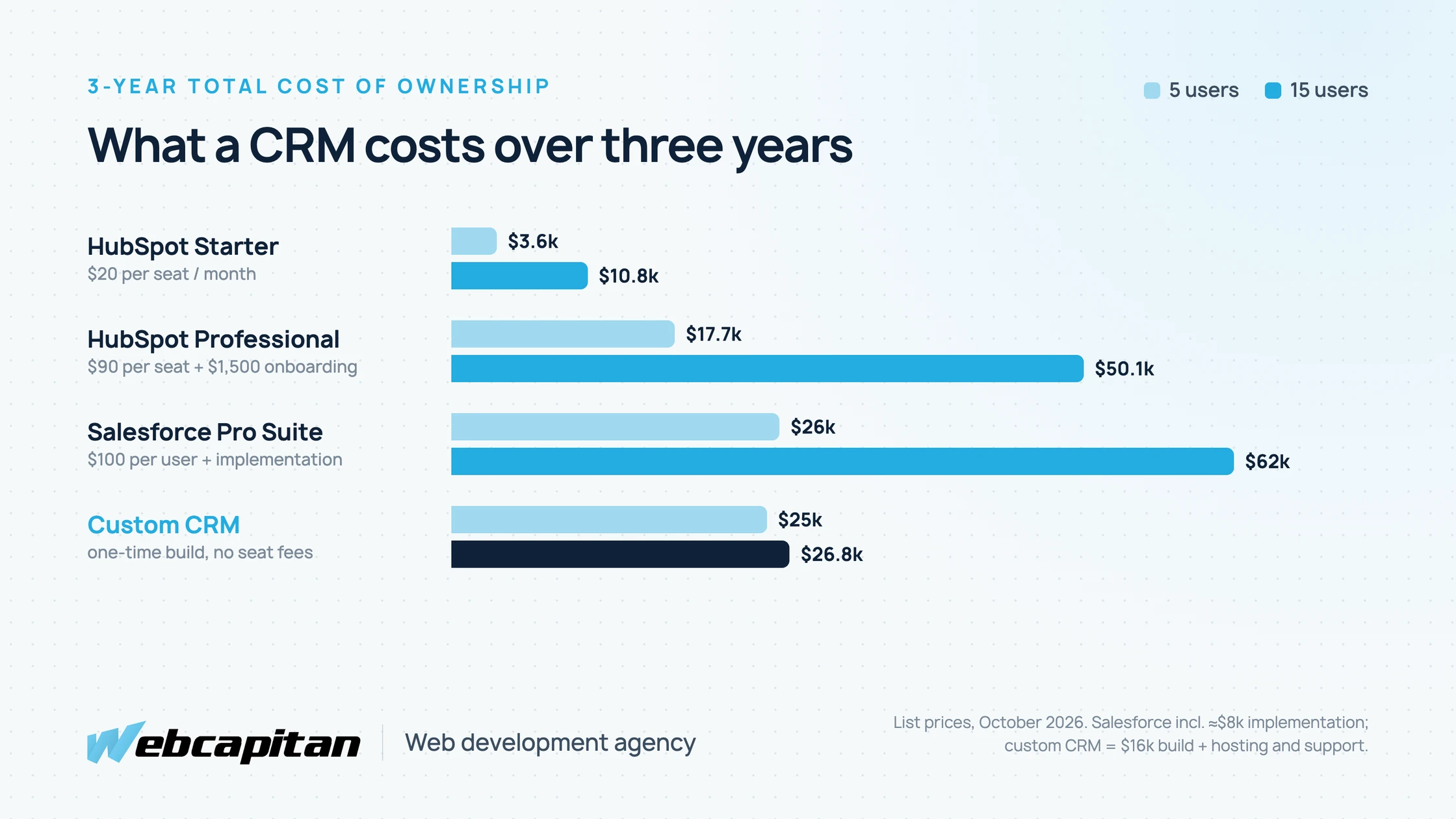
Estimated three-year cost for 5 and 15 users. Licence list prices as of October 2026; the custom CRM includes the build plus hosting and support.
How Much Does HubSpot Cost in 2027?
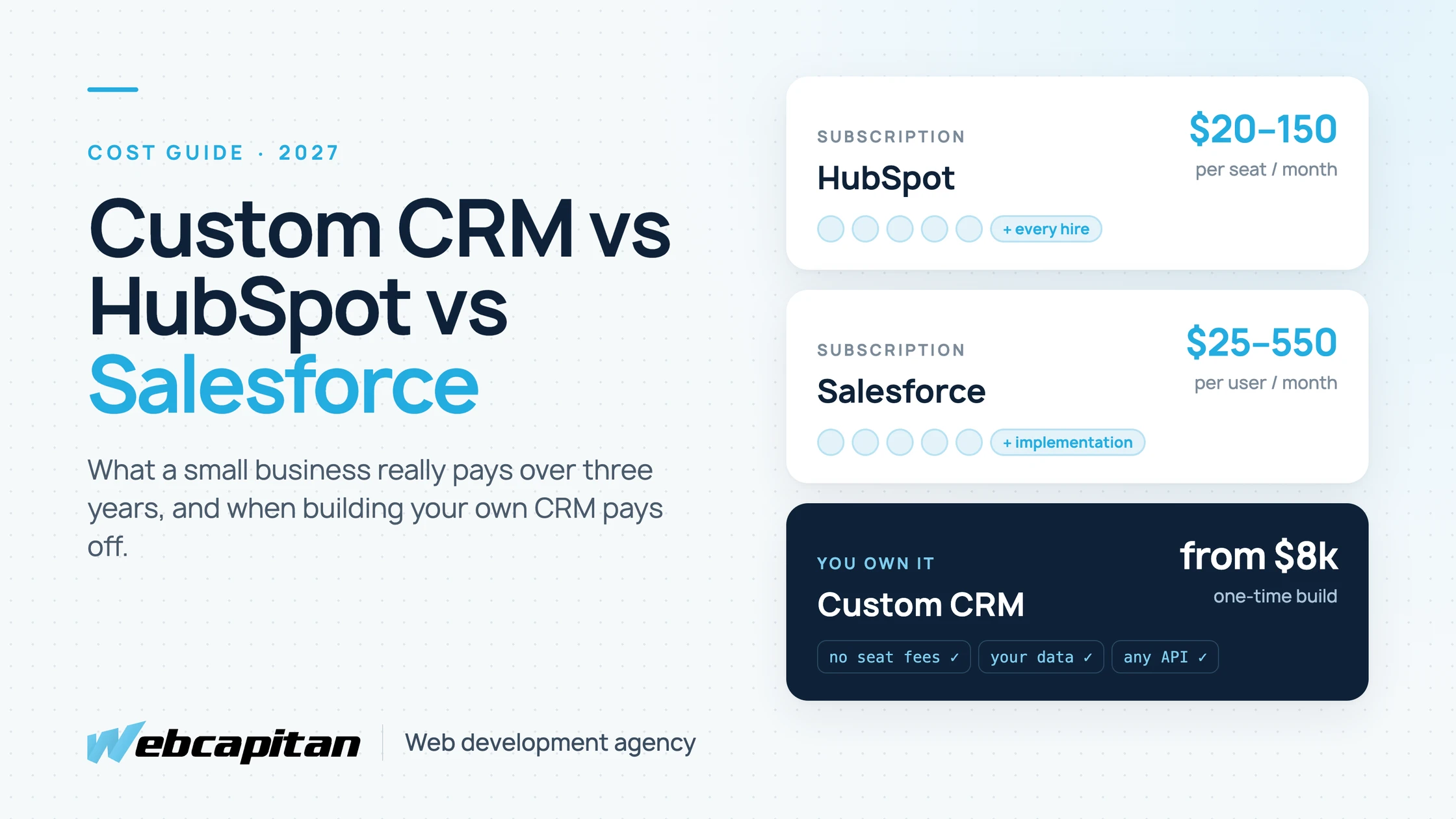
HubSpot Sales Hub costs from about $20 per seat per month on Starter to $90–$100 on Professional and $150 on Enterprise, plus a one-time onboarding fee on the upper tiers.
- Free CRM: contacts, deals and a basic pipeline for a couple of users. Good for trying the tool, not for running a team.
- Starter: around $20 per seat per month (less on annual billing, and HubSpot often runs promotions). Removes branding, adds simple automation and more pipelines.
- Professional: about $90 per seat per month billed annually, or $100 monthly, plus a $1,500 onboarding fee. This is where sequences, workflows, forecasting and custom reports live, which is why most growing teams end up here.
- Enterprise: about $150 per seat per month plus a $3,500 onboarding fee, for custom objects, advanced permissions and team hierarchies.
The hidden cost is the jump between Starter and Professional. The features that make a CRM save time (automated follow-ups, lead routing, proper reporting) mostly sit in Professional, so a five-person team that starts at roughly $1,200 a year can quickly face $5,400 a year plus onboarding. If you also use Marketing Hub, its price grows with the number of marketing contacts, not only with seats.
How Much Does Salesforce Cost in 2027?
Salesforce Sales Cloud costs $25 per user per month on Starter Suite and $100 on Pro Suite, with the larger editions at $195, $395 and $550 per user per month, all billed annually.
- Free Suite: a limited entry plan for very small teams.
- Starter Suite: $25 per user per month, the only edition you can pay monthly. Basic sales, service and email in one app.
- Pro Suite: $100 per user per month. Forecasting, quoting, more automation and customisation.
- Core, Advanced and Max: $195, $395 and $550 per user per month for full customisation, APIs, AI features and premium support.
Salesforce rarely ends at the licence. Most businesses hire an implementation partner to configure objects, automation and reports, which commonly runs from a few thousand dollars for a simple setup to $15,000 or more. Once the system grows, many companies also need a part-time Salesforce admin. Some features, such as API access on lower editions or revenue intelligence, are paid add-ons.
How Much Does a Custom CRM Cost?
A custom CRM for a small business typically costs $8,000 to $25,000 to build and $150 to $400 per month to host and maintain, with no per-user fees.
The price depends on scope more than on the number of people who will use it:
| Scope | What it includes | Typical cost | Timeline |
|---|---|---|---|
| Lean CRM (MVP) | Contacts, companies, deals, a pipeline board, tasks, notes, website form capture, roles | from $8,000 | 6–8 weeks |
| Business CRM | Everything above plus email sync, automated follow-ups, quotes or invoices, dashboards, two or three integrations | $12,000–$25,000 | 2–4 months |
| Operations platform | CRM plus orders, projects, client portal, complex permissions and many integrations | $25,000+ | 4+ months |
After launch you pay for hosting (often $20 to $100 a month for a small team), backups, security updates and small improvements. Budget roughly 15 to 20 percent of the build cost per year for maintenance and new features.
What you get for that money is a system that matches your process exactly, has no seat limits, keeps your data in your own database, and can connect to anything with an API: your website, accounting, telephony, warehouse or your own product.
Three-Year Cost Comparison for 5 and 15 Users
For five users, HubSpot Starter is by far the cheapest; for fifteen users, a custom CRM costs roughly half of HubSpot Professional or Salesforce Pro Suite.
The numbers below use list prices as of October 2026 and simple assumptions: 36 months of licences (HubSpot Professional at its annual-billing rate), HubSpot's onboarding fee, about $8,000 of Salesforce implementation work, and a $16,000 custom build with $250 to $300 a month of hosting and support.
| Option (3 years) | 5 users | 15 users |
|---|---|---|
| HubSpot Sales Hub Starter | ≈ $3,600 | ≈ $10,800 |
| HubSpot Sales Hub Professional | ≈ $17,700 | ≈ $50,100 |
| Salesforce Pro Suite + implementation | ≈ $26,000 | ≈ $62,000 |
| Custom CRM (build + hosting and support) | ≈ $25,000 | ≈ $27,000 |
Two things stand out. First, a custom CRM is not a way to save money for a five-person team that would be happy on HubSpot Starter. Second, licence costs grow with every hire, while a custom system's cost barely moves, so the gap widens every year after the break-even point.
When a Custom CRM Makes Sense
A custom CRM makes sense when the cost of adapting your business to a tool is higher than the cost of building a tool that fits your business.
Typical signs:
- Your team is growing past 10–15 users and per-seat pricing is becoming one of your larger software bills.
- Your process is not a standard sales funnel: for example, project-based sales with several approvals, a booking or dispatch flow, rental or subscription management, or a mix of sales and operations in one place.
- You already pay for workarounds: Zapier chains, spreadsheets next to the CRM, or a consultant who keeps "customising" a tool that fights back.
- The CRM must live inside your product or website, for example a client portal where customers see their orders and documents.
- Data ownership matters: you want customer data in your own database, in a region you choose, without export limits.
When HubSpot or Salesforce Is the Better Choice
An off-the-shelf CRM is the better choice when you need to start quickly, your sales process is standard, and your team is small.
- You have fewer than ten salespeople and a classic lead → deal → won pipeline.
- You want marketing email, landing pages and the CRM in one subscription, without a development project.
- You need to be live in days, not weeks.
- You rely on ready-made apps from a large marketplace and have nobody to own a custom system.
Choosing HubSpot or Salesforce for these reasons is not a compromise. It is the right business decision, and you can still move later if the costs or limits start to hurt.
The Middle Path: Off-the-Shelf CRM With Custom Integrations
For many small businesses the best value is to keep HubSpot or Salesforce and pay once for custom integrations that remove manual work.
Instead of rebuilding the CRM, a developer connects it to the systems around it: website forms and quote calculators that create deals with the right fields, WooCommerce or Shopify orders synced to contacts, invoices created in your accounting tool when a deal is won, or call logs from your telephony. This keeps licence costs on a lower tier, because the custom code does the work that would otherwise require a higher plan. Our CRM integration services page explains how we approach this, and third-party API integration covers connections to other tools.
How We Build a Custom CRM
We build custom CRMs as web applications on Node.js with a React or Next.js interface, a PostgreSQL or MySQL database, and role-based access, hosted on infrastructure you own.
- Discovery (1–2 weeks). We map your pipeline, roles, documents and integrations, and agree what goes into the first version.
- Design (1–3 weeks). Screens for the pipeline, contact cards and dashboards in Figma, tested with the people who will use them every day.
- Build (4–10 weeks). Releases every one or two weeks, so your team can try real screens early.
- Data migration and launch. We import contacts, companies and deal history from your spreadsheets or current CRM, then train the team.
- Support. Hosting, backups, security updates and a monthly allowance for improvements.
The code and the data are yours. If you ever change developers, the system goes with you. See our Node.js and Next.js development service for the stack we use.
Get a Free CRM Cost Estimate
If you are comparing a CRM subscription with a custom build, send us your team size, your current tools and a short description of your sales process. We will tell you honestly whether a custom CRM, an off-the-shelf CRM with integrations, or simply a better HubSpot or Salesforce setup gives you the lowest three-year cost, and send a fixed estimate if building makes sense. Contact Webcapitan for a free estimate.
About the author

CEO & Founder, Webcapitan
Roman Yashchuk founded Webcapitan in 2014 and leads the team of 22 designers and developers in Vinnytsia and London. He works hands-on in UI/UX design, WordPress and PHP/Laravel development, and writes about choosing platforms, costs and keeping websites fast and secure.
All articles by Roman Yashchuk