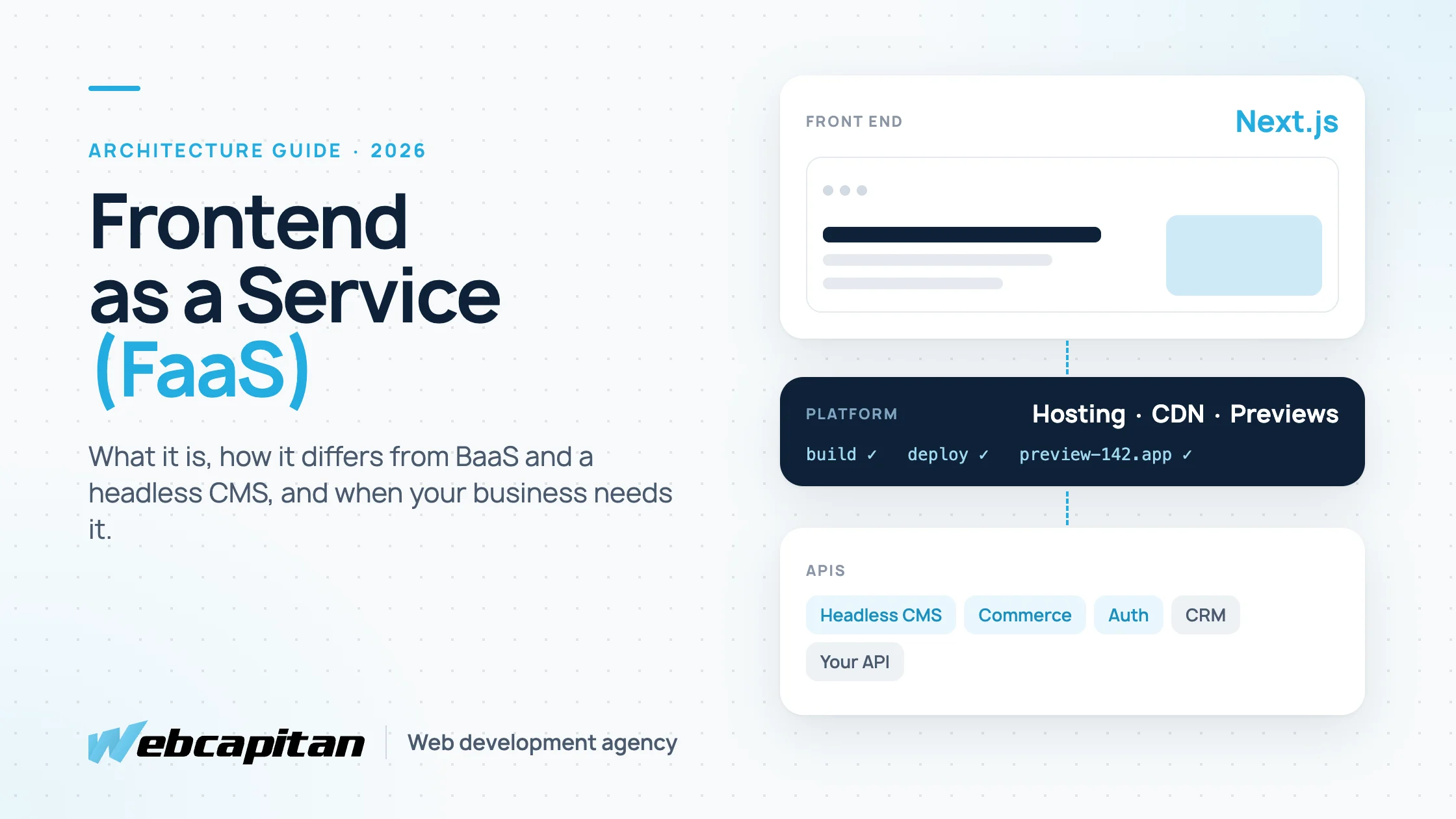
Frontend as a Service (FaaS) is a way of running the public face of a website or app as a managed service: the interface is built with a modern framework such as Next.js, deployed to a platform that handles hosting, a global CDN, builds and scaling, and it pulls content and data from separate services through APIs. The term is also used for the business model where an agency provides front-end development as an ongoing service instead of a one-off project.
This guide covers both meanings in plain language: how the architecture works, how it differs from Backend as a Service and a headless CMS, what you gain, what can go wrong, and when a business actually needs it. It is written for business owners, marketing leads and product managers, not for developers.
What does Frontend as a Service mean?
Frontend as a Service means the front end of your product is treated as its own layer, built and hosted separately from the systems that store your data, and delivered as a managed service.
In a classic website, one application does everything. WordPress, for example, stores the content, runs the plugins, builds the HTML and serves it to every visitor from one server. In a FaaS setup those jobs are split:
- The front end is a separate application, usually written in React with Next.js, Nuxt or Astro. It owns the layout, routing, page speed, SEO markup and everything the visitor sees and clicks.
- The platform builds that application and serves it from servers close to each visitor. Vercel describes itself as a "frontend cloud"; Netlify, Cloudflare Pages and AWS Amplify offer similar services.
- The back ends are separate services the front end talks to: a headless CMS for content, an e-commerce engine, a payment provider, a login service, a search service, or your own API.
The second meaning is commercial rather than technical. Some agencies sell front-end development "as a service": a dedicated developer or a small team on a monthly plan who build and improve your interface continuously. Both meanings share one idea: the front end is a product in its own right, with its own team, budget and release cycle.
FaaS vs BaaS vs headless CMS vs SaaS
These terms describe different layers of the same stack, and a real project often combines several of them.
| Model | What you get as a service | Typical examples | What you still build yourself |
|---|---|---|---|
| Frontend as a Service | Building, hosting and scaling the interface; previews of every change; a global CDN | Vercel, Netlify, Cloudflare Pages, AWS Amplify | The interface itself, and the back ends it reads from |
| Backend as a Service (BaaS) | Database, file storage, user accounts and server functions behind an API | Firebase, Supabase, AWS Amplify back end | The interface and your business logic on top of it |
| Headless CMS | Content editing for your team, delivered to any front end through an API | Contentful, Sanity, Strapi, WordPress used headless | The front end that renders the content |
| SaaS | A complete finished application you configure | Shopify, HubSpot, Webflow | Almost nothing, but you live within its limits |
A common combination for a business website is a Next.js front end on a FaaS platform, content from a headless CMS and forms sent to a CRM. A common combination for a start-up is the same front end with a BaaS such as Supabase behind it.
How the architecture works
The front end is built once when content or code changes, stored as ready pages on a CDN, and only calls the back ends for the parts that must be live.
A typical request flow looks like this:
- A developer pushes a change to the code repository, or an editor publishes a page in the CMS.
- The platform rebuilds the affected pages and gives the change its own preview link, so the team can check it before it goes live.
- Approved pages are copied to servers around the world. A visitor in London and a visitor in New York both get the page from a server near them.
- Dynamic parts, such as prices, stock, a logged-in dashboard or a search box, call the relevant API directly or through small server functions that run on the same platform.
Nothing in this list requires a FaaS platform specifically. The same Next.js application can run on your own server. We do exactly that for our own site: when we moved our agency website from WordPress to Next.js and Node.js, we chose to host the front end ourselves next to our API. The architecture is the same; the difference is who runs the servers.
Benefits of Frontend as a Service
The main benefits are speed for visitors, speed for the team and the freedom to change one layer without rebuilding the others.
- Fast pages everywhere. Pages are prepared in advance and served from nearby servers, which helps Core Web Vitals and conversion, especially for visitors far from your main server.
- Traffic spikes are the platform's problem. A campaign or a mention in the press does not take the site down, because static pages scale almost without limit.
- A preview for every change. Marketing, design and the client see each change on its own link before it is published, which shortens review cycles.
- Smaller attack surface. The public site has no admin login and no plugins exposed to the internet. Editors log in to the CMS, which can sit on a separate address.
- Independent layers. You can redesign the front end without touching the CMS, or replace the e-commerce engine without rebuilding every page.
- One front end, many sources. Content from a CMS, products from Shopify, reviews from another service and data from your own API can appear on one page.
Risks and costs to plan for
FaaS moves complexity rather than removing it: you trade one system for several services, and each has its own bill, limits and failure modes.
- More moving parts. A classic WordPress site is one system. A FaaS site might be a front end, a platform, a CMS, a form service and a search service. Someone has to own how they fit together.
- Usage-based pricing. Platforms usually charge per team seat plus usage such as bandwidth, build minutes and server function calls. A traffic spike, a bot or a misconfigured image setting can turn into an unexpected invoice. Set spending limits and alerts from day one.
- Vendor lock-in. Some framework features work best, or only, on a specific platform. Keep your application portable enough to run on another host or on your own server.
- Editor experience. Previews, drafts and page building must be set up deliberately. Without that work, editors lose the "what you see is what you get" feeling they had in WordPress.
- Developer skills. You need people comfortable with JavaScript frameworks and APIs. The pool is large, but it is a different pool from WordPress theme developers.
- Higher starting cost. Building a separate front end costs more than installing a theme. A headless website with a Next.js front end usually costs $6,000–$15,000, which we break down in our guide to headless WordPress with Next.js.
When does a business need Frontend as a Service?
FaaS makes sense when the front end is a competitive advantage or has to combine several data sources; it is overkill for a simple brochure site that a theme can serve well.
It usually fits when:
- Page speed and SEO directly affect revenue, for example a lead-generation site in a competitive market or a content site with thousands of pages.
- The site combines content, product data and logged-in features, such as a SaaS marketing site with an account area.
- Several channels need the same content: a website, a mobile app, a customer portal.
- Your audience is spread across countries and a single server location makes the site slow for part of it.
- You release changes often and want every change reviewed on a preview link before it goes live.
It usually does not fit when:
- You need a five-to-fifteen page brochure site that changes a few times a year. A well-built WordPress site is cheaper to build and to run.
- Your marketing team builds pages daily with a visual builder and does not want to change that workflow.
- Nobody on your side, or at your agency, will own the extra services after launch.
Frontend as a Service as an agency model
In its second meaning, FaaS is a way to buy front-end work: a monthly plan with a dedicated developer or team instead of a fixed-price project.
This suits products that change constantly: new landing pages, A/B tests, new features in a dashboard, design system updates. The team stays the same, keeps context about your product and works from a backlog you prioritise. It does not suit a single website that will be built once and then left alone; a fixed-scope project is simpler there.
At Webcapitan, front-end work for a landing page starts from $800, a web application interface starts from $8,000, hourly work is $30–60 and a dedicated developer starts from $4,000 a month. Our front-end development cost guide explains what drives those numbers, and if you are still unsure what the term front end covers, start with what front-end development is.
Examples of FaaS setups
Most real FaaS projects are one of a few recurring patterns.
- Marketing site on a headless CMS. A Next.js front end on a FaaS platform, pages edited in Sanity, Contentful or headless WordPress, forms sent to HubSpot or another CRM.
- Headless store. A custom storefront for speed and design freedom, with Shopify or WooCommerce handling products, cart and checkout through their APIs.
- SaaS product site plus app. The public marketing pages are static and fast; the logged-in application on a subdomain talks to the product's own API or a BaaS such as Supabase.
- Multi-brand or multi-country sites. One shared front end codebase serves several brands or languages, each with its own content in the CMS.
How to decide: a short checklist
Answer these questions; the more "yes" answers, the stronger the case for a separate, service-based front end.
- Does page speed measurably affect your leads or sales?
- Does your site need data from more than one system?
- Do you have, or plan to hire, developers comfortable with React and APIs?
- Will the same content appear in more than one channel?
- Do you release changes every week or more often?
- Is your budget above roughly $6,000 for the build, with a monthly budget for services and support?
If you answered "no" to most of them, a classic CMS website is the better investment today, and you can move to a separate front end later without losing your content.
Frequently asked questions
Is Frontend as a Service the same as serverless?
No. Serverless describes how code runs: in short-lived functions without a server you manage. FaaS platforms use serverless functions for the dynamic parts of a site, but the term Frontend as a Service describes the whole approach of building and hosting the interface as a separate managed layer.
Can WordPress be used with Frontend as a Service?
Yes. WordPress can act as a headless CMS: editors keep wp-admin and the block editor, while a Next.js front end on a FaaS platform or your own server renders the pages. You lose plugins that output HTML on the front end and need replacements for them.
Is FaaS more secure than a traditional website?
The public site usually has a smaller attack surface because it serves prepared pages and has no admin login or plugins exposed. Security does not disappear, though: the CMS, the APIs and the platform account all need strong passwords, two-factor authentication and updates.
How much does a FaaS platform cost per month?
Most platforms have a free tier for small projects and paid plans that combine a price per team member with usage limits. For a typical business website the platform bill is small compared with development and content costs, but always set spending limits, because usage-based pricing can grow quickly during traffic spikes.
What is the difference between front-end development services and Frontend as a Service?
Front-end development services usually mean a project: an agency builds an interface and hands it over. Frontend as a Service means either an ongoing subscription to a front-end team or the technical model of hosting the interface as a managed service. Many projects use both.
Conclusion
Frontend as a Service separates the part of your product people see from the systems that store your data, and lets a platform handle hosting, scaling and previews. It pays off when speed, several data sources or frequent releases matter, and it is unnecessary overhead for a small brochure site. If you are weighing it for your next project, our framework development team can look at your requirements and tell you whether a separate front end is worth it. Send us a short brief and we will reply with an honest recommendation and an estimate.
About the author

CEO & Founder, Webcapitan
Roman Yashchuk founded Webcapitan in 2014 and leads the team of 22 designers and developers in Vinnytsia and London. He works hands-on in UI/UX design, WordPress and PHP/Laravel development, and writes about choosing platforms, costs and keeping websites fast and secure.
All articles by Roman Yashchuk