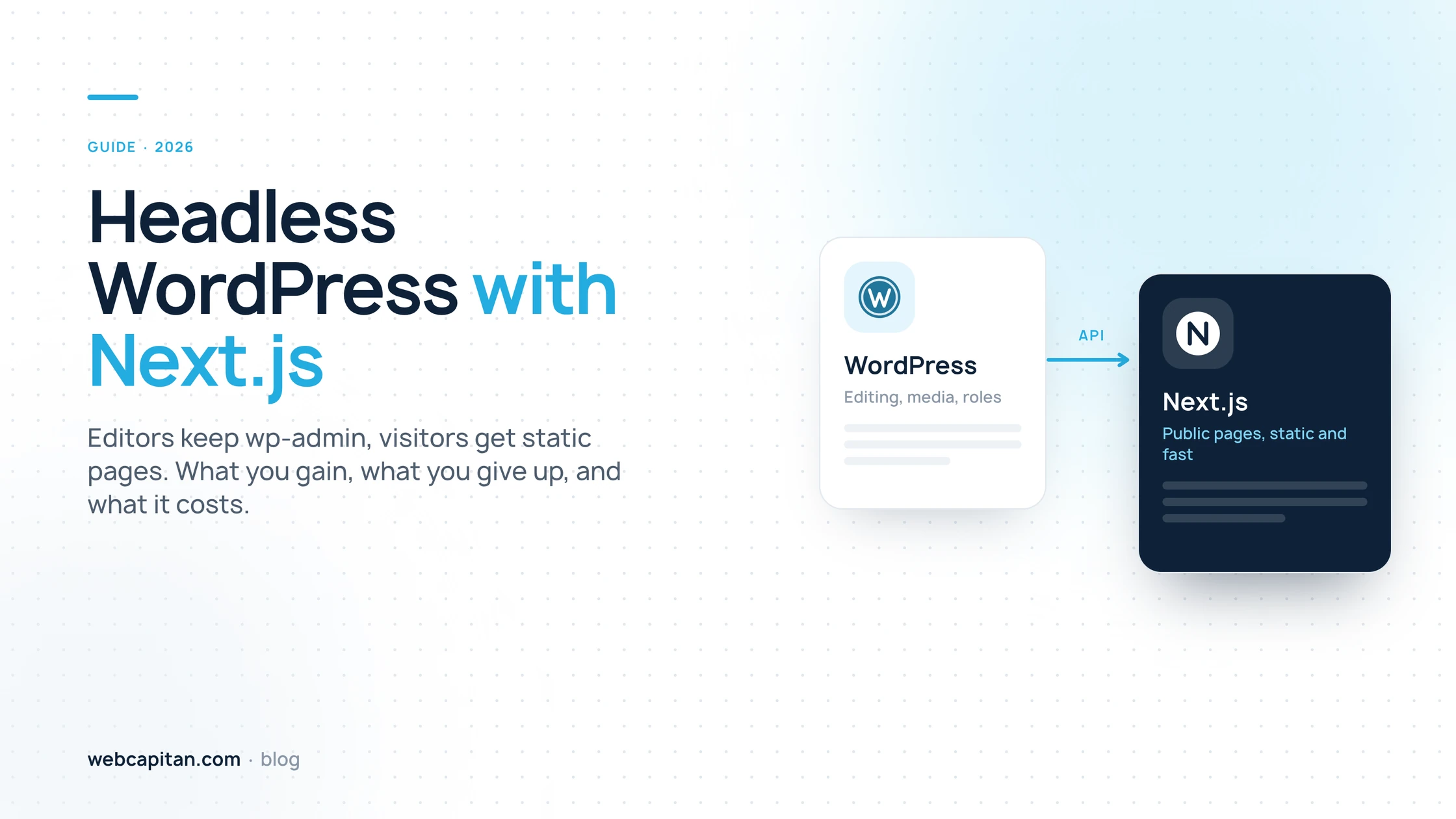
Headless WordPress means WordPress keeps doing what your team already knows, editing content, while a separate front end built with Next.js renders the pages visitors actually see. The two halves talk through the WordPress REST API or WPGraphQL. You get static, fast pages with no plugins or login on the public domain, and your editors keep wp-admin, the block editor, the media library and their roles.
It is not a free upgrade. A headless build costs from $2,500 and takes six to ten weeks, you run two services instead of one, and every plugin that renders something on the front end needs a replacement. This guide explains how the architecture works, what genuinely improves, what you give up, what it costs and how a migration runs, so you can decide whether it fits your site before anyone writes code.
What does headless WordPress actually mean?
Headless WordPress is a normal WordPress installation with its theme layer switched off: it stores and manages content, and serves that content as data through an API instead of rendering HTML pages. The "head" is the public website, and in this setup it is a separate application, in our case Next.js.
In a classic WordPress site, one PHP application does everything: it holds the content, runs the theme and plugins, queries the database and prints HTML on every request. In a headless setup those jobs split in two:
- WordPress (the back end). Posts, pages, custom fields, taxonomies, media, users, roles, editorial workflow. Everything the marketing team touches stays where it is.
- Next.js (the front end). Page templates as React components, routing, metadata, structured data, sitemaps, image optimisation and the caching strategy.
Nothing about the writing experience changes. An editor opens wp-admin, writes in the block editor, uploads an image, clicks Publish. What changes is what happens after that click.
How the architecture works
The database is read when an editor publishes, not when a visitor arrives. WordPress fires a webhook, Next.js rebuilds the affected pages once and writes them to cache as static HTML, and every visitor after that is served a file.
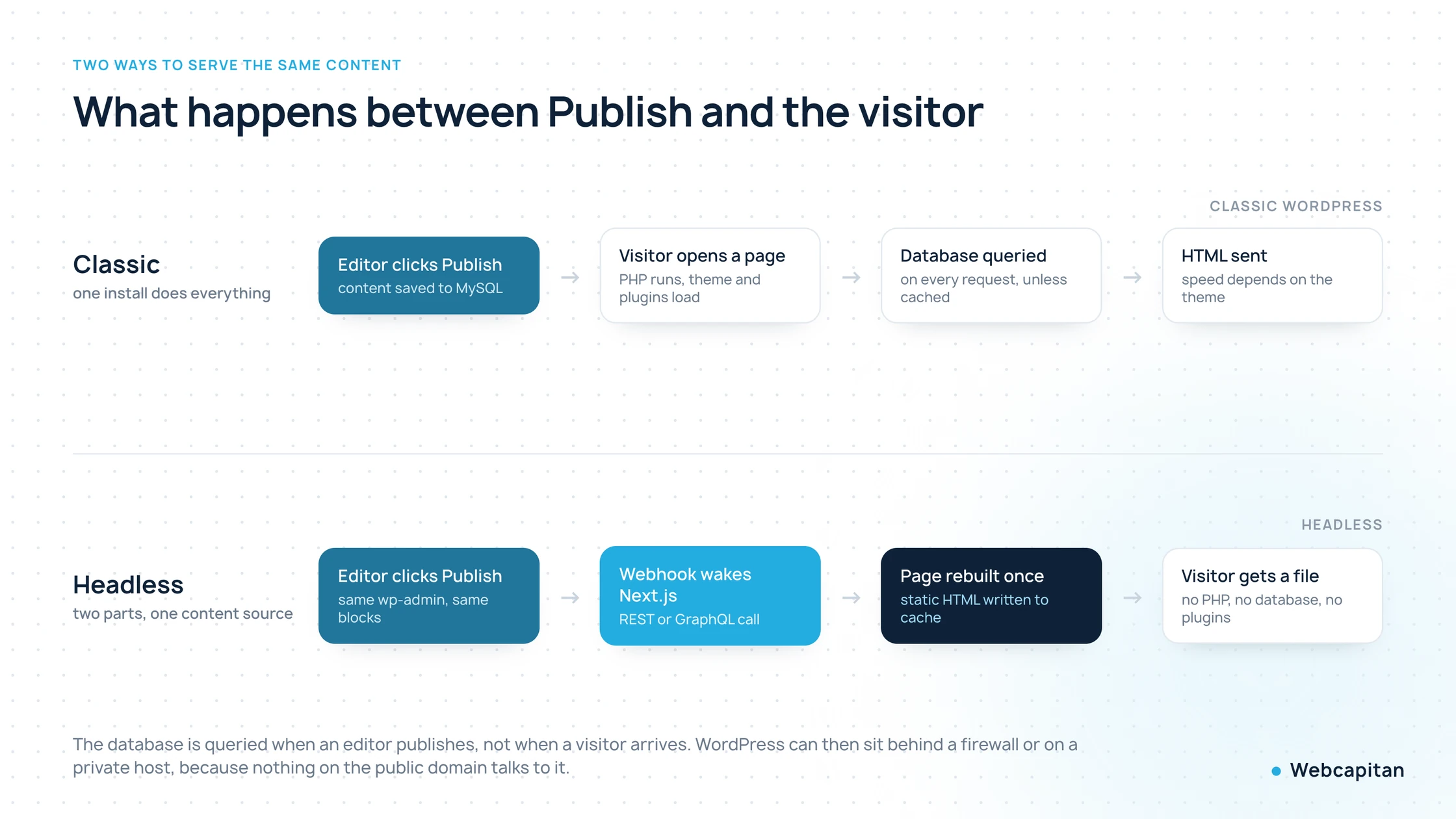
In a classic setup every visitor triggers PHP and a database query. In a headless setup that work happens once, when content changes.
The pieces you need to get right:
- The content API. Either the built-in REST API or WPGraphQL. GraphQL wins when a page needs several related content types at once, because it fetches them in one request instead of five. REST is simpler and perfectly adequate for a blog or a service catalogue.
- The content model. Custom post types, custom fields (usually Advanced Custom Fields) and taxonomies designed so the API returns exactly what a template needs. This is where most of the planning time goes, and it is what separates a headless site that is pleasant to edit from one that fights you.
- Rendering strategy. Pages are generated at build time or on first request and then cached. Next.js revalidates a page when its content changes rather than rebuilding the whole site, so a typo fix goes live in seconds even on a site with thousands of pages.
- Previews. Draft previews must open on the Next.js front end, using a signed preview route that reads the unpublished revision. Without this, editors lose the preview button they rely on, which is the single most common complaint about badly built headless projects.
- Media. Images stay in the WordPress media library and are served either from there or through the front end's image pipeline, resized and converted to modern formats on the way.
- Forms, search and interactivity. Whatever a plugin used to render on the public side is now built in the front end and posts back to an API endpoint.
What you actually gain
The three real wins are speed, a much smaller attack surface and complete design freedom. Everything else on the usual marketing list follows from those.
Speed that holds
A static page has no PHP to execute and no database to query, so time to first byte is measured in tens of milliseconds and stays flat whether ten or ten thousand people are reading. More importantly, the speed does not decay: on a classic site every new plugin adds CSS and JavaScript to every page, while on a headless site the front end only ships what its own components need. We moved our own site to a Next.js front end in September 2026 and its home page now sends an 18 KB HTML document and reaches Largest Contentful Paint in about 1.9 seconds on a throttled mobile connection.
A much smaller attack surface
The public domain has no wp-admin, no xmlrpc.php, no plugin code and no database connection. WordPress itself can sit on a private host or behind a firewall, reachable only by the build process. This matters more than it sounds: the overwhelming majority of WordPress compromises come through plugins and themes on the public install. Our own site was hit by the Japanese keyword hack through exactly that route, and removing the public PHP layer removes the route.
Design and structure freedom
The front end is React, so a layout is limited by the design, not by what a theme or page builder supports. The same content can also feed more than one output: a marketing site, a regional site, a mobile app or a partner feed, all reading the same API.
SEO parity, not magic
Headless does not rank better by itself. What it gives you is fast, server-rendered HTML and full control over titles, descriptions, canonicals, structured data and sitemaps. Yoast or Rank Math data is carried across the API into the front end, so nothing is lost. If you want the longer comparison, read React vs Next.js vs WordPress for a business website.
What you give up
You give up plugin-driven front-end features, some editor conveniences, and the simplicity of running one thing instead of two. These are real costs and any agency that does not mention them is selling, not advising.
- Front-end plugins stop working. Contact forms, sliders, pop-ups, site search, membership gates, cookie banners: anything a plugin used to print on the page must be rebuilt in the front end. Plugins that only affect the admin, such as ACF, custom post type tools or editorial workflow, keep working untouched.
- Page builders are out. Elementor, Divi and WPBakery render their own markup on the front end, so they cannot come along. Layout moves from the builder into templates plus fields or blocks. For teams that rearrange sections weekly this is a genuine loss, and often the reason to stay classic.
- Previews need building. They work well once implemented, but they are development work, not a checkbox.
- Two systems to run. Two hosting environments, two update cycles, two sets of logs and backups. WordPress still needs its core and plugin updates even when it is private.
- A smaller talent pool. A classic WordPress site can be picked up by almost any freelancer. A headless one needs someone comfortable in both React and WordPress, which costs more per hour.
- More upfront cost. You are paying to build what a theme would have given you for free.
What headless WordPress costs
A headless WordPress site with a Next.js front end typically costs from $2,500 to build and $30 to $150 a month to run, against roughly from $1,300 for a comparable classic WordPress build. The gap is the front end you are now building by hand instead of buying as a theme.
| Item | Classic WordPress | Headless with Next.js |
|---|---|---|
| Design and build | from $1,300 | from $2,500 |
| Timeline | 2–6 weeks | 6–10 weeks |
| Hosting | $5–100 a month | $30–150 a month (two services) |
| Maintenance | from $15 a month | from $15 a month, fewer plugins to patch |
| Plugin and theme licences | $100–600 a year | Usually none |
| Adding a new page template | Hours, or none with a builder | Developer hours |
| Publishing an article | No developer | No developer |
What moves the number most is the count of unique page templates, the number of integrations and how much content has to be migrated and re-modelled. A five-template site with a clean content structure lands near the bottom of the range; a catalogue with twelve templates, multilingual content and a CRM integration lands at the top. For the classic-side figures in detail see how much a WordPress website costs.
When is headless WordPress worth it?
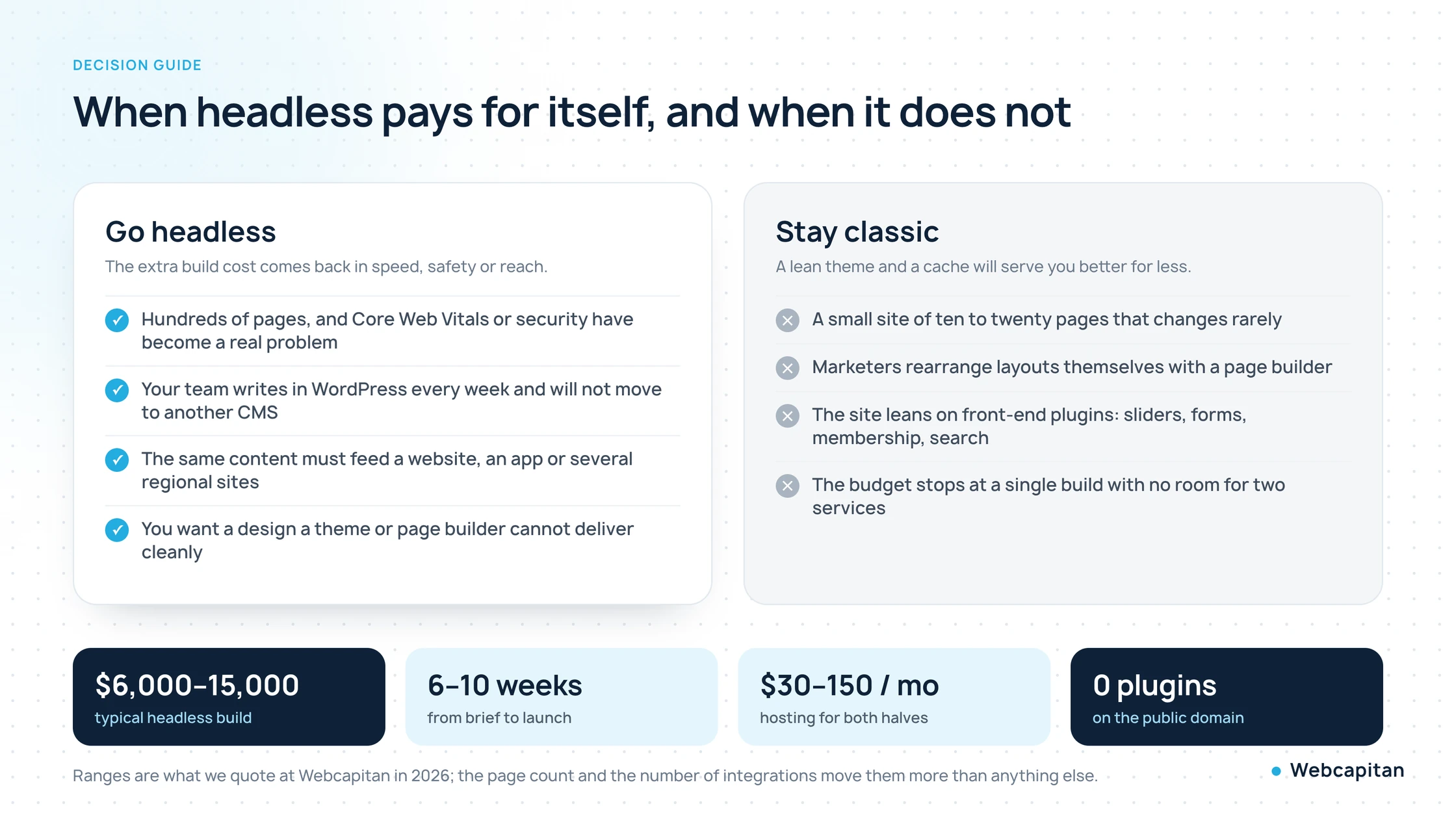
Go headless when the site is large or important enough that speed and security have become business problems, and your team will not give up the WordPress editor. Stay classic when the site is small, changes shape often, or leans on front-end plugins.
Worth it
- Hundreds or thousands of pages where Core Web Vitals have stopped improving no matter how many cache plugins you add.
- A site that has been hacked before, or one where a security incident would cost real money.
- Content that must feed more than one destination: several sites, an app, a partner feed.
- A design that a theme or page builder cannot deliver without fighting it.
- Traffic spikes from campaigns, where static pages simply do not fall over.
Not worth it
- Ten to twenty pages that change a few times a year. A lean custom theme and a page cache will be faster to build and cheaper to run.
- A marketing team that builds landing pages themselves in Elementor and would have to stop.
- Heavy reliance on front-end plugins you do not want to rebuild.
- A budget that covers one build with nothing left for two environments.
There is a middle path worth knowing about: keep classic WordPress but rebuild the theme properly, drop the page builder and cut the plugin list. That fixes most speed problems for a fraction of the cost, and we recommend it more often than headless. Our custom WordPress development page covers that route.
How a migration to headless runs
A migration takes six to ten weeks and keeps every existing URL, so rankings carry over. The order matters: content model first, front end second, SEO parity checked before launch rather than after.
- Audit and content model (week 1). Every template on the current site is listed, the content is mapped to post types and fields, and the API shape is agreed. You get a fixed estimate broken down by template.
- Back end preparation (weeks 1–3). Custom post types, fields and taxonomies are set up or cleaned, WPGraphQL or REST endpoints exposed, editorial roles and previews planned. Editors can keep publishing on the live site throughout.
- Front end build (weeks 2–7). Templates and components built in Next.js from the design, connected to the API, with a staging URL from the first week so you can click through real content early.
- SEO and performance pass (week 7–8). URL parity checked address by address, metadata and structured data carried over, redirects added only where something genuinely changed, Core Web Vitals verified on a mid-range phone.
- Launch and hardening (week 8–10). DNS switch, WordPress moved behind a firewall or to a private host, monitoring and backups for both halves, editor training on previews and publishing.
The single most common mistake is treating the migration as a front-end project and leaving the content model as it was. If the data comes out of the API in an awkward shape, every template pays for it forever.
Frequently asked questions
Will our editors have to learn a new CMS?
No. They keep wp-admin, the block editor, the media library and their existing roles. The two things that change are that draft previews open on the new front end, and that layout is controlled by templates rather than by dragging sections in a builder.
Do WordPress plugins still work with a headless setup?
Admin-side plugins do: custom fields, SEO fields, editorial workflow, import tools. Plugins that render on the public site do not, because there is no PHP theme to render into. Forms, search, sliders and similar features are rebuilt in the front end, usually as a better version of what the plugin did.
Is headless WordPress better for SEO?
Not automatically. It gives you fast, server-rendered pages and full control over metadata and structured data, which removes the usual technical obstacles. Content quality, internal links and page speed still decide rankings, and a well-built classic WordPress site can match a headless one.
Can we move to headless without losing rankings?
Yes, if URLs, content and metadata are preserved. We keep every public address, carry titles, descriptions and structured data across, redirect only what genuinely changed and check each old URL before launch. We did exactly this for our own domain in September 2026.
Is headless the same as a static site generator?
They overlap. A static site generator builds every page at build time; Next.js can do that and can also render on demand or revalidate a single page when its content changes. For a site with thousands of pages that difference matters, because you do not want a full rebuild for one typo.
Can we go back to classic WordPress later?
Yes. The content never leaves WordPress, so reverting means building or reinstating a theme. That is real work, but no data is trapped, which is not true of every headless CMS.
Conclusion
Headless WordPress with Next.js buys you speed, security and design freedom at the price of a bigger build, a rebuilt front-end feature set and two systems to run. For a large, content-heavy site where the WordPress editor is non-negotiable and page speed has become a business problem, the trade is usually worth it. For a small site that changes shape often, a well-built classic theme is the better deal, and we will say so.
We build both. See headless WordPress with Next.js for how we run these projects, WordPress API integration if you only need the data layer, or tell us about your site and we will tell you honestly which of the two fits.
About the author

CEO & Founder, Webcapitan
Roman Yashchuk founded Webcapitan in 2014 and leads the team of 22 designers and developers in Vinnytsia and London. He works hands-on in UI/UX design, WordPress and PHP/Laravel development, and writes about choosing platforms, costs and keeping websites fast and secure.
All articles by Roman Yashchuk