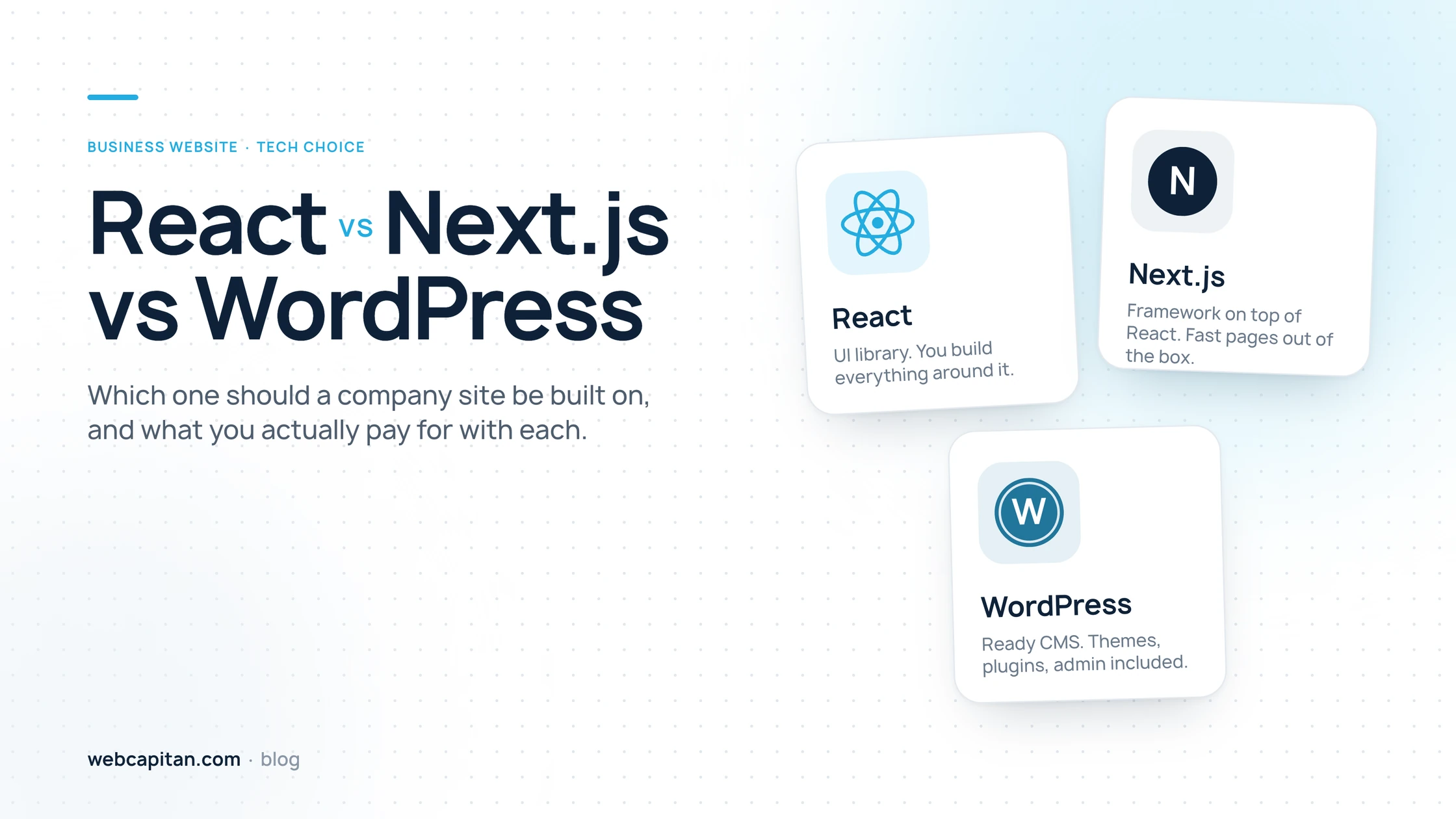
"Should our website be built on React, Next.js or WordPress?" is one of the most common questions we hear from business owners in 2026, and the honest answer starts with a correction: these three are not the same kind of thing. React is a library for building interfaces, Next.js is a framework built on top of React that turns it into a complete website engine, and WordPress is a ready content management system with an admin panel, themes and plugins. Choosing between them is really a choice about who will edit the site, how fast it must be, how much you want to maintain, and what you are willing to pay up front.
Short answer: WordPress is the right default for most small and medium businesses whose team edits content every week and wants to launch fast. Next.js is the better choice when speed, security and search performance matter more than editing without a developer, or when the site has custom logic. React on its own is a fit for web applications, not for marketing websites. Below we explain why, with the numbers from our own move of webcapitan.com from WordPress to Next.js in September 2026.
React vs Next.js vs WordPress: the quick comparison
Here is the whole article in one table. Every row is explained further down.
| Criterion | React (alone) | Next.js | WordPress |
|---|---|---|---|
| What it is | UI library | Framework on top of React | Content management system |
| Best for | Web apps, dashboards | Fast marketing sites, sites with custom logic | Content-heavy business sites, blogs, small shops |
| Time to launch a 10-page site | 6–10 weeks | 4–8 weeks | 2–5 weeks |
| Editing content yourself | Only with a separate CMS | With a CMS or a custom admin panel | Built in, anyone can do it |
| Speed out of the box | Slow first load (JavaScript first) | Fast (ready HTML, static pages) | Depends on theme, plugins and cache |
| SEO | Needs extra setup | Excellent by design | Good with an SEO plugin |
| Security work | Low | Low | Constant: core, theme and plugin updates |
| Hosting | Any static host | Node server or a platform such as Vercel | Any PHP hosting, from $5 a month |
| Finding developers | Easy | Easy | Easiest |
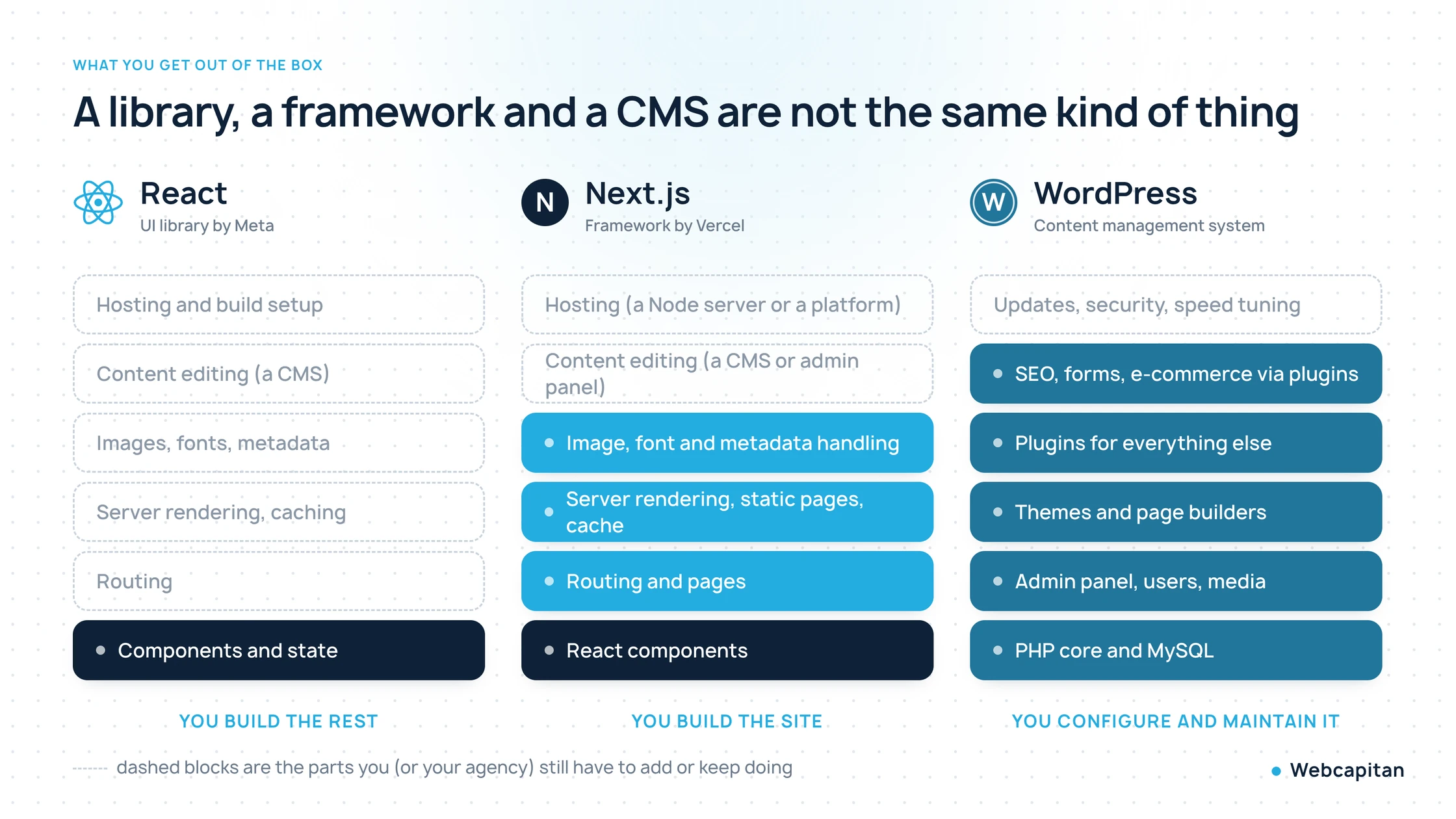
A library, a framework and a CMS include very different amounts of a finished website. The dashed blocks are what you still have to add or keep doing.
What React, Next.js and WordPress actually are
React is a JavaScript library for building user interfaces, Next.js is a React framework that adds everything a website needs around those interfaces, and WordPress is a complete website system written in PHP with its own admin panel. That difference explains most of the pros and cons below.
React: a library for interfaces
React, maintained by Meta, gives developers a way to build an interface from reusable components. It does not decide how pages are routed, how they are rendered for search engines, how images are optimised or where the content lives. A "React website" is therefore always React plus a set of other tools chosen by the developer. That flexibility is why product teams love it for web applications, and why it is rarely a good choice on its own for a company website. If you want a plain-English overview of this part of the stack, read our article on what front-end development is.
Next.js: React turned into a website engine
Next.js, maintained by Vercel, takes React and adds the missing pieces: a page and routing system, rendering on the server, static generation of pages at build time, caching, image and font optimisation, metadata for SEO and a place to run server code. The result is that a Next.js page arrives in the browser as ready HTML, exactly like a classic website, while still using React components under the hood. It is the most popular way to build React websites today, and it is what webcapitan.com runs on now.
WordPress: a complete CMS
WordPress is a full content management system: a PHP application with a MySQL database, an admin panel, users and roles, a media library, themes for design and more than 60,000 plugins for everything else. It powers over 40% of all websites, which is why every hosting company supports it and every marketer has used it. The price for that completeness is that a WordPress site is a collection of third-party parts that must be kept up to date and that all run on every request.
Speed and Core Web Vitals: where the waiting happens
Next.js is the fastest of the three by default because the server sends finished HTML, WordPress can be fast with a good theme and a page cache, and a React single-page app is the slowest to show its first content because the browser must download and run JavaScript before anything appears.
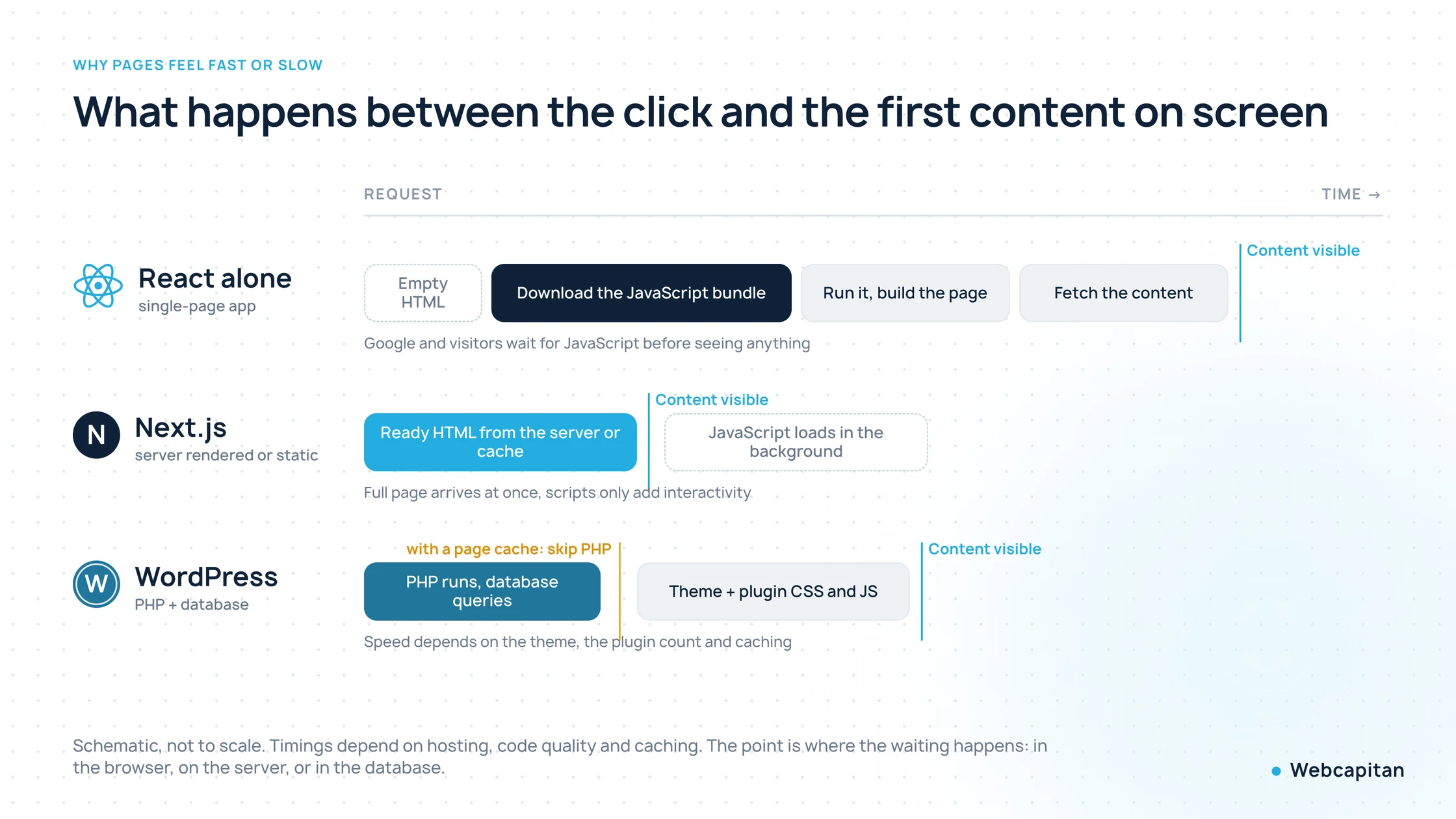
Where visitors and Googlebot wait: in the browser (React alone), on the server (Next.js) or in PHP and the database (WordPress without a page cache).
Google measures this with Core Web Vitals: Largest Contentful Paint should be under 2.5 seconds, Interaction to Next Paint under 200 milliseconds and Cumulative Layout Shift under 0.1, all for real visitors on mobile. Here is how our own Next.js site measures today. We loaded webcapitan.com with a headless Chrome on an emulated mid-range Android phone, a throttled 4G connection and a 4x slower CPU, which is close to the conditions Google uses for its mobile score:
| webcapitan.com on Next.js | Mobile, throttled 4G | Desktop |
|---|---|---|
| Time to first byte | 0.24 s | 0.11 s |
| First content on screen (FCP) | 1.9 s | 0.6 s |
| Largest Contentful Paint | 1.9 s | 0.6 s |
| Layout shift (CLS) | 0.008 | 0 |
| HTML document | 18 KB | 18 KB |
| Everything loaded | 442 KB | 337 KB |
The point is not that 1.9 seconds is a magic number. The point is that we got it without a cache plugin, an image optimiser, a minifier or a CDN plugin: the pages are built once and served as files. Our old WordPress site needed WP Rocket, an image optimisation plugin and constant tuning to stay under the same limits, and the home page still carried the CSS and JavaScript of a page builder on every request.
To be fair to WordPress: a lean theme, a page cache and a few plugins can get very close to these results. The difference is that on WordPress you have to work to stay fast, and every new plugin can undo it. On Next.js, fast is the default, and slow is something a developer has to introduce.
Content editing: who updates the site every week?
WordPress wins on editing by a wide margin because the admin panel, the editor and the media library come built in, while React and Next.js need a separate CMS or a custom admin panel before a non-developer can change a single word.
This is the criterion most agencies underplay when they sell a React project, and the one that matters most to a marketing team. On WordPress your marketer can create a landing page on Monday morning, drop in a form, change the hero image and publish before lunch. With a page builder such as Elementor or Divi they can also change the layout. It is not always pretty, and it is where most slow, messy WordPress sites come from, but it works without a developer.
With Next.js you have three options, each with a different cost:
- A headless CMS (Sanity, Contentful, Storyblok, Strapi, or WordPress itself used only as an editor). The team edits in the CMS, Next.js renders the pages. Editing is comfortable, but the layouts are fixed by the developer, and the CMS usually has a monthly fee.
- A custom admin panel built for exactly your content. This is what we did for our own site: services, cases, blog posts, FAQs and SEO fields are all edited in a small React admin. It fits the business perfectly, but it is extra development work up front.
- Content in code, where every change goes through a developer. Cheap to build, expensive to live with. We do not recommend it for a business website.
The rule of thumb: if you cannot name the person who will update the site every week, choose WordPress. If you can, and they mostly write articles and update a fixed set of pages, Next.js with a CMS or an admin panel works well.
SEO: which one ranks better?
All three can rank equally well when set up correctly; the difference is how much setup it takes. Next.js gives search engines ready HTML, clean URLs, fast pages and full control over metadata, structured data and sitemaps. WordPress gets there with a plugin such as Yoast or Rank Math plus a good theme. React on its own needs server rendering or pre-rendering added by the developer, otherwise Googlebot sees an empty page and fills in the content later, which delays indexing and hurts rankings.
Two things from our own experience are worth adding. First, URLs matter more than the platform. When we moved webcapitan.com to Next.js we kept every public URL exactly as it was on WordPress, with no redirects, so no ranking was lost in the move. Second, security is an SEO factor. In May 2026 our WordPress site was hit by the Japanese keyword hack, which put 17,000 spam URLs into Google under our domain and took over 74% of our impressions by June. No theme or plugin choice would have helped as much as not having the attack surface at all.
Security and maintenance: the cost nobody budgets for
A WordPress site needs updates every week and a security routine, because the core, the theme and every plugin are public software with known vulnerabilities; a Next.js or React site has no admin login on the public site, no plugins and no database on the request path, so its attack surface is a fraction of the size.
Our old site had 37 plugins in the plugins folder. Every one of them was code written by someone else, running on our server, with its own update schedule. Yearly reports from WordPress security vendors consistently show that the overwhelming majority of WordPress vulnerabilities are in plugins rather than in the core, so the plugin count is a good proxy for risk. Maintenance for a business WordPress site typically means:
- Core, theme and plugin updates, ideally on a staging copy first, because updates break things.
- Daily backups stored away from the server, and a tested restore procedure.
- A firewall and a malware scanner, and someone who reads their alerts.
- Removing abandoned plugins and replacing those that are no longer maintained.
- Hardening: strong passwords, two-factor login, limited login attempts, disabled XML-RPC and file editing.
Agencies sell this as a maintenance plan for roughly $50–300 a month, and it is money well spent if you stay on WordPress. On Next.js the list is much shorter: update the framework a few times a year, keep the server or platform patched, keep backups of the content. That is the "hidden" line that changes the total cost of ownership over three years, even when the WordPress build was cheaper.
Cost to build and run over three years
WordPress is the cheapest to launch, Next.js and React cost more up front because more is built rather than installed, and the gap narrows over time as WordPress maintenance and plugin licences add up.
| Typical business website, 10–20 pages | React (custom) | Next.js | WordPress |
|---|---|---|---|
| Design and build | from $2,500 | from $2,200 | from $1,300 |
| Content editing setup | Included in build, or a CMS | CMS ($0–300 a month) or custom admin | Included |
| Hosting | $0–50 a month | $0–100 a month | $5–100 a month |
| Maintenance and security | $0–100 a month | $0–100 a month | from $15 a month |
| Plugin and theme licences | None | None | $100–600 a year |
| Cost of a small change | Developer hours | Developer hours, or none if it is content | Usually none |
These are ranges from projects we see at Webcapitan and from the wider market, not a quote. The takeaway is simple: if the site is small and changes often, WordPress stays the cheapest option over three years. If the site is fast, mostly stable in structure and important for lead generation, Next.js catches up and often ends cheaper once you count maintenance and the cost of a slow or hacked site. You can read more about what a company site is worth in why your business needs a website.
Hiring: who will build and support it?
WordPress developers are the easiest to find and the cheapest per hour, React and Next.js developers are also plentiful in 2026 but cost more, and the real risk is not availability but quality: a badly built site on any of the three platforms is expensive to fix.
WordPress work ranges from freelancers installing a theme for a few hundred dollars to agencies building custom themes, and the quality varies just as widely. A cheap WordPress build usually means a heavy multipurpose theme, a page builder and 30 plugins, which is exactly the setup that gets slow and hacked. A good WordPress build uses a custom theme, few plugins and a maintenance routine. Ask any agency how many plugins their last site shipped with; the answer tells you a lot.
React and Next.js are the most widely used front-end technologies in the world, so finding developers is not a problem. What you should check is whether the team has built websites, not only apps: metadata, structured data, sitemaps, image handling and an editing workflow for your team are website skills that many app developers have never needed. Our framework development service exists for exactly this kind of project.
How to choose: a decision guide
Most business websites can be settled with three questions: is it really a web app, will your team rearrange pages every week without a developer, and are speed, SEO and security worth having a developer on call for changes.
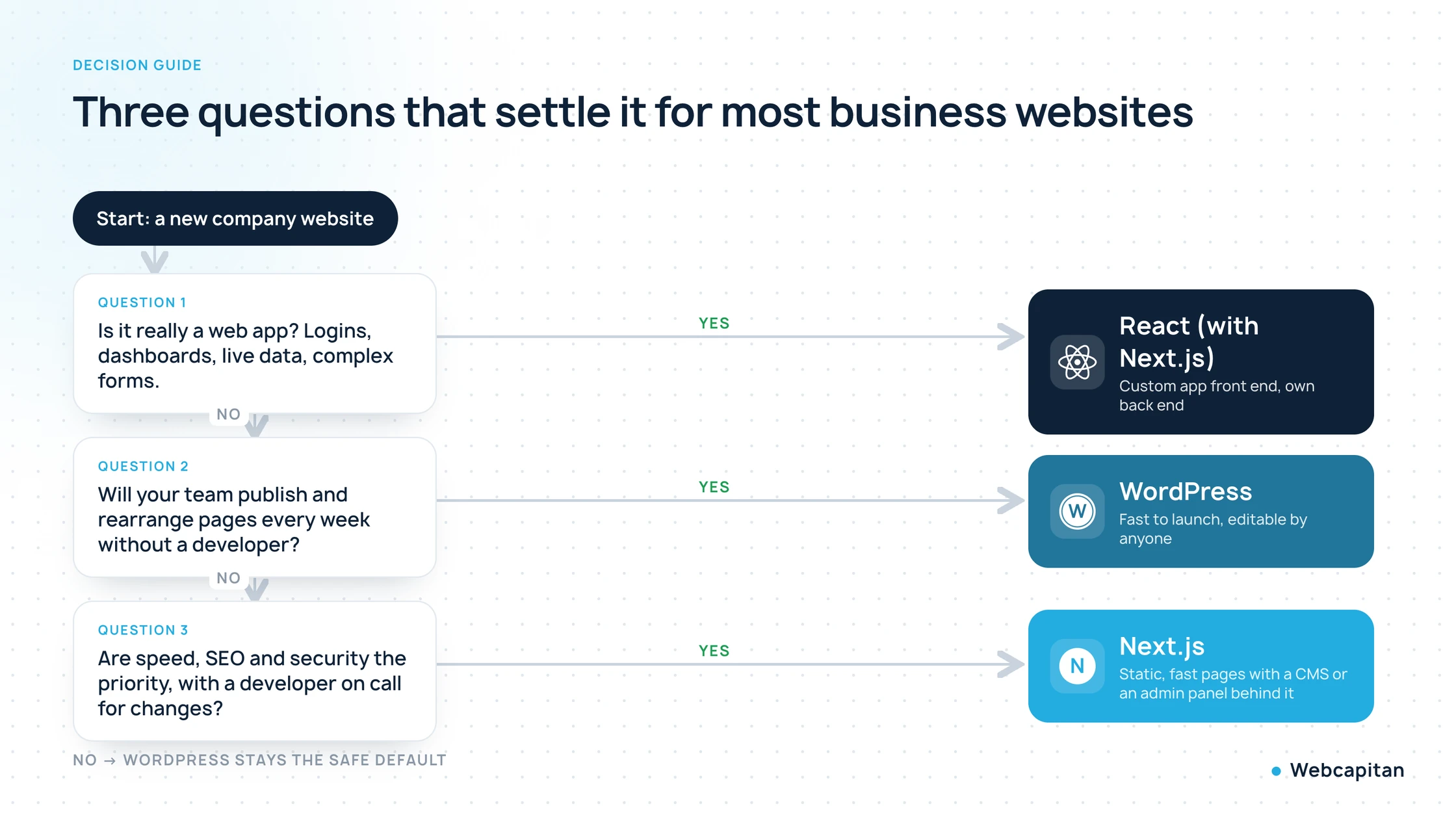
Three questions that decide it for most companies. When none of them is a clear yes, WordPress remains the safe default.
Choose WordPress if
- your marketing team publishes landing pages, articles and offers every week and wants to change layouts without a developer;
- you need to launch in a few weeks on a limited budget;
- you need a small online shop, a booking system, a membership area or another feature that a mature plugin already solves;
- you are prepared to pay for hosting, updates and security every month, or to hire someone who does.
Choose Next.js if
- the site is a lead-generation asset where speed, Core Web Vitals and search performance directly affect revenue;
- the structure is stable: services, cases, blog, contact, and content changes fit into a CMS or an admin panel;
- you have been hacked before, or you do not want a plugin update schedule to be part of your business;
- the site needs custom features: calculators, configurators, client portals, integrations with your CRM or an internal API.
Choose React on its own if
- you are building a web application: dashboards, accounts, real-time data, complex forms, and the marketing pages are secondary;
- even then, in 2026 we would usually build it with Next.js rather than plain React, because you get the same components plus routing, rendering and a much better public face for free.
The middle road: headless WordPress with Next.js
If your team loves the WordPress editor but you want Next.js speed and security on the public site, WordPress can be used as a headless CMS: editors work in wp-admin, and Next.js fetches the content through the REST API or GraphQL and renders the pages. You keep the familiar editing, the public site becomes static and fast, and the WordPress install can be hidden from the internet. The trade-offs are cost (two systems instead of one), previews that need extra work, and plugins that only affect the admin side. We will cover this option in detail in a separate article; our WordPress development team builds both classic and headless setups.
Our own case: webcapitan.com from WordPress to Next.js
We moved our own agency website from WordPress to Next.js in September 2026, and the deciding factors were security and control rather than fashion.
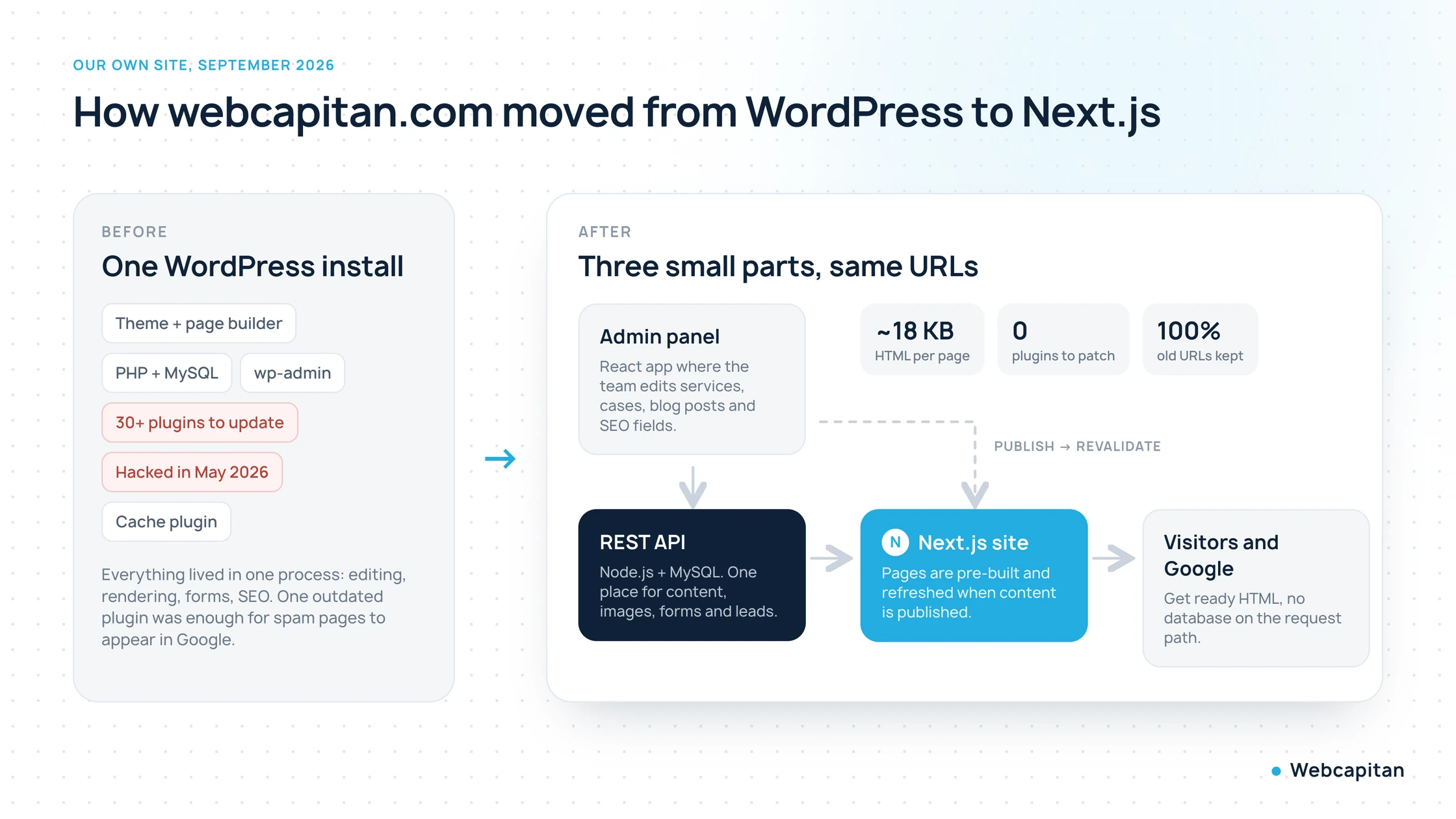
Before: one WordPress install with 37 plugins. After: a small admin panel, a REST API and a Next.js site, with every old URL kept.
The old site was a typical agency WordPress: a custom theme, Advanced Custom Fields, Yoast, WP Rocket, an image optimiser, a forms plugin, a redirect plugin and around thirty others. It worked, and it ranked. Then, in May 2026, an outdated component let an attacker inject thousands of Japanese spam pages. Cleaning WordPress is possible, but we were already unhappy with the speed and with the amount of time spent on updates, so we rebuilt:
- Next.js public site. Pages are generated at build time and refreshed automatically when someone publishes in the admin, so visitors and Googlebot always get ready HTML. The home page HTML is 18 KB.
- A small admin panel in React where the team edits services, cases, blog posts, FAQs, team members, SEO titles and descriptions, and sees leads and Search Console data in one place.
- A Node.js REST API with MySQL that stores the content, handles forms, sends mail and serves images. It is the only part that talks to the database, and it is not exposed to the public site's visitors.
- Same URLs. Every public page kept its WordPress address, so nothing had to be redirected and no rankings were lost in the move. The old WordPress is archived on a hidden subdomain that returns noindex for everything.
What we gave up: the ability to drag a new section into a page without a developer. What we gained: mobile pages that show content in under two seconds on a throttled connection, zero plugin updates, a login that does not exist on the public domain, and a site that is exactly as complex as our business needs. For an agency that has developers in the building, that trade was easy. For a company without one, it might not be, and that is the whole point of this article.
Frequently asked questions
Is Next.js better than WordPress for SEO?
Not automatically. Both can rank equally well. Next.js gives you fast, server-rendered pages and full control over metadata without plugins, while WordPress needs an SEO plugin and a well-built theme to get the same result. The platform matters far less than page speed, content quality, clean URLs and staying secure.
Can I use React for a business website?
Yes, but use it through Next.js rather than as a plain single-page application. A plain React site shows an empty page until its JavaScript has loaded, which is bad for first impressions and for search engines. Next.js fixes that while keeping everything you like about React.
Is WordPress still worth it in 2026?
Yes, for the right site. If your team edits content constantly, your budget is limited and you can commit to updates and security, WordPress remains the fastest way to a working business website. Its problems come from heavy themes, too many plugins and neglected maintenance, not from WordPress itself.
How much faster is Next.js than WordPress?
Out of the box, a Next.js site typically shows its first content two to three times sooner than a WordPress site with a page builder and no cache, because it sends ready HTML with much less CSS and JavaScript. A well-optimised WordPress site with a lean theme and a page cache can come close. Our own Next.js home page reaches Largest Contentful Paint in about 1.9 seconds on a throttled mobile connection.
Can I move from WordPress to Next.js without losing rankings?
Yes, if you keep the same URLs, the same content and the same page structure, submit the new sitemap and check every old address returns 200 on the new site. We did exactly that with webcapitan.com and lost no rankings in the move. Redirect chains, changed URLs and dropped pages are what cause losses, not the platform.
Conclusion
React, Next.js and WordPress answer different questions. WordPress asks "how quickly can non-developers run this site?", Next.js asks "how fast, secure and tailored can this site be?", and React asks "what application are we building?". Pick the question that matches your business, and the platform follows. If you are unsure which one that is, tell us about the site: we build on both WordPress and Next.js, we have lived with both on our own domain, and we will tell you which one we would choose in your place, including when the answer is the cheaper one.
About the author

CEO & Founder, Webcapitan
Roman Yashchuk founded Webcapitan in 2014 and leads the team of 22 designers and developers in Vinnytsia and London. He works hands-on in UI/UX design, WordPress and PHP/Laravel development, and writes about choosing platforms, costs and keeping websites fast and secure.
All articles by Roman Yashchuk