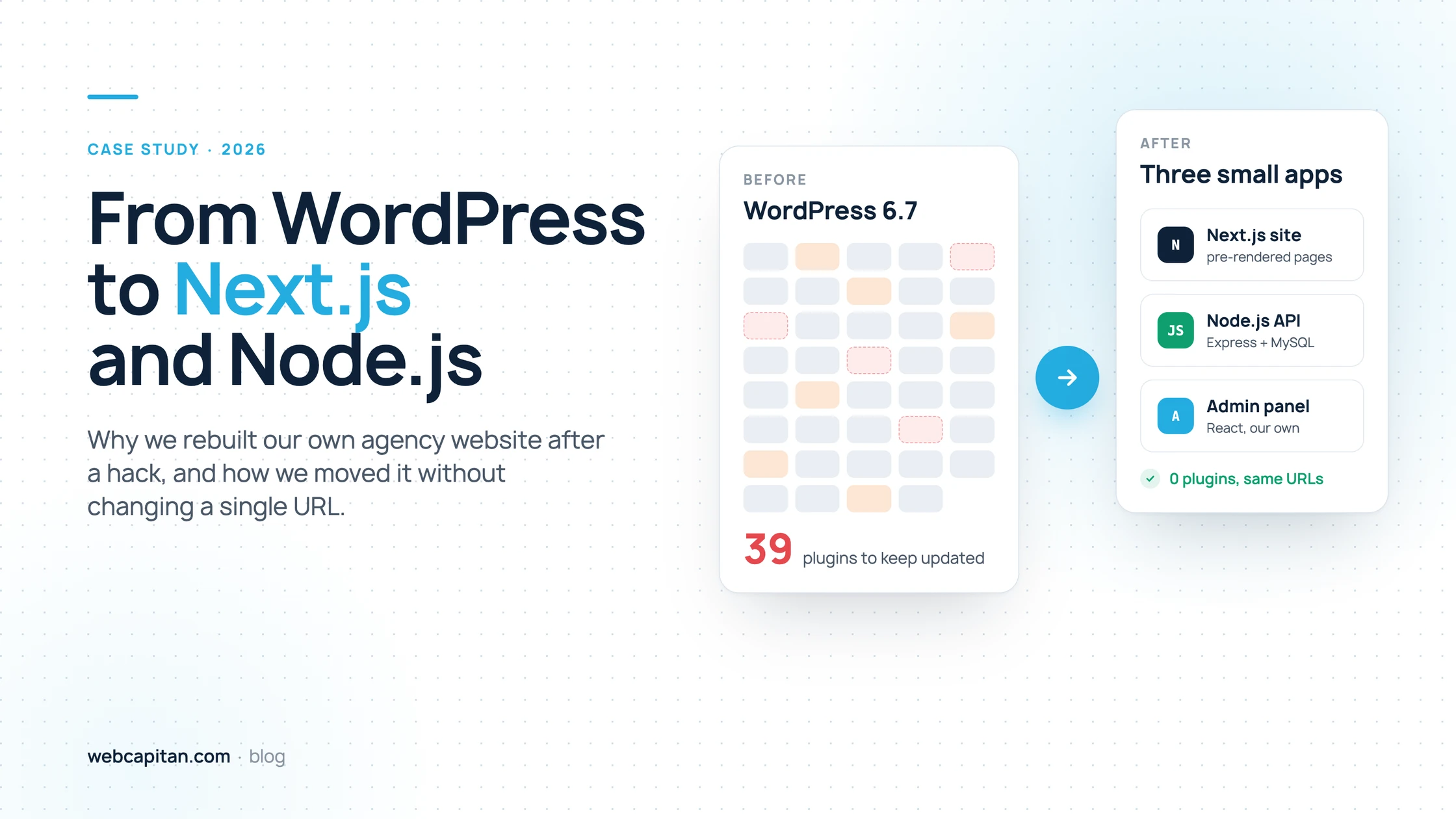
In 2026 we moved our own website, webcapitan.com, from WordPress to Next.js and Node.js. The short reason: a Japanese keyword hack took over our search traffic, the site depended on 39 plugins, and we wanted our own website to run on the stack we now build for clients. We rebuilt it in about three months, kept every public URL exactly the same and launched on 14 September 2026.
This is the full story with real numbers from our Search Console: why we left WordPress, why we picked Next.js and Node.js instead of another CMS, how the migration worked step by step, what we built instead of wp-admin and what the results look like so far. It is written for business owners and marketing managers who are thinking about the same move. If you only want the pros and cons of the stacks, read React vs Next.js vs WordPress for a business website first.
One thing up front: we still build WordPress websites, and for many businesses WordPress is the right choice. This article explains why it stopped being the right choice for our own site.
WordPress to Next.js migration at a glance
The new site does the same job as the old one with three small applications instead of a theme and 39 plugins. The table shows what changed.
| Before: WordPress | After: Next.js + Node.js | |
|---|---|---|
| Core | WordPress 6.7, custom theme, Advanced Custom Fields Pro | Next.js 16 site, Node.js (Express) API, React admin |
| Plugins | 39, including two caching plugins and three image optimisers | None: every feature is our own code |
| Database | MySQL with WordPress tables | MySQL with tables designed for our content |
| Admin | wp-admin, open to the internet at a known address | Our own admin panel with short-lived tokens and CSRF protection |
| Pages | Built by PHP on request, then cached by plugins | Pre-rendered by Next.js and refreshed when content changes |
| URLs | Identical: every public page kept its address, no redirects | |
| Timeline | Work started in June 2026, the site went live on 14 September 2026, the redesign followed on 6 October 2026 | |
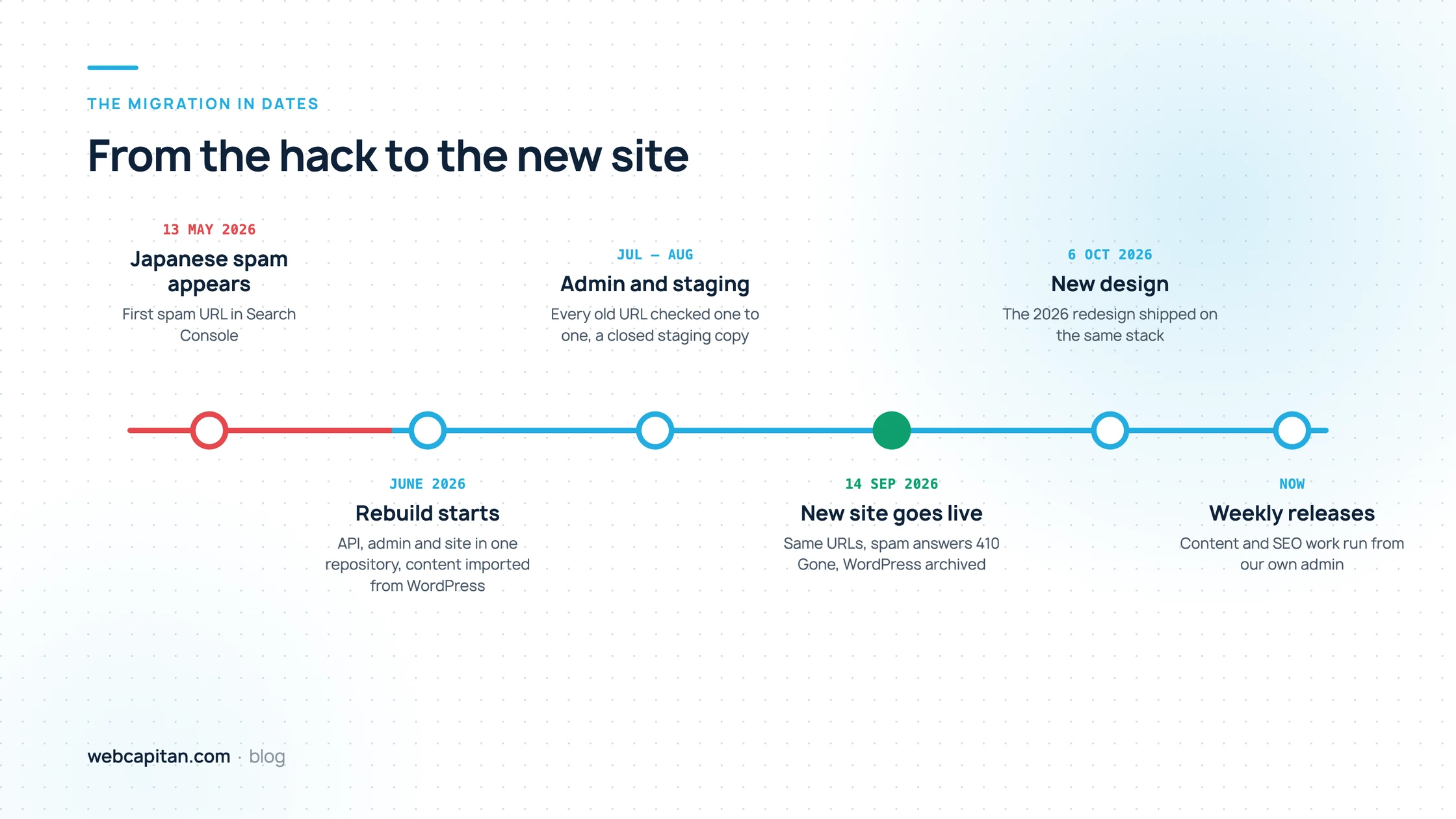
The migration in dates, from the first spam URL to the new design.
What our WordPress site looked like
Our WordPress site was a typical ten-year-old business website: a solid custom theme with a plugin added every time we needed something new. None of the plugins were bad on their own. Together they were a lot to keep updated and secure.
When we took stock before the move, the site ran WordPress 6.7.5 with a custom theme built on Advanced Custom Fields Pro and 39 plugins. Some of them did the same job twice:
- Two caching plugins (WP Rocket and another cache plugin) and three image optimisers (EWWW, Imagify and Optimole), each added at a different time to fix a speed problem.
- Two backup and migration plugins, a redirect manager, a permalink manager and a plugin that forces lowercase URLs.
- Debugging tools (Query Monitor, Debug Bar and an error log viewer) that stayed installed after the problem they were added for was fixed.
- Plugins for SEO, the sitemap, the table of contents, code highlighting, SVG uploads, post ordering, view counters, mail delivery and contact forms.
Every plugin is code from a different author that has to be updated, checked for conflicts and trusted with access to your database. That is fine when someone looks after the site every week. For an agency site that the team updates between client projects, it was a growing risk.
The trigger: a Japanese keyword hack
The decision became urgent in May 2026, when our site was hit by the Japanese keyword hack. Spam pages in Japanese started appearing in Google under our domain, and within weeks they were collecting more impressions than our real pages.
The first spam URL appeared in our Search Console data on 13 May 2026. Over the following months 17,433 different spam URLs of the form /?o=311104616700 received impressions, and in June 74% of all our impressions came from spam. The 16-month Performance report shows the attack clearly: the clicks (blue) shot up in May and June, but they were clicks on spam, not on our services.
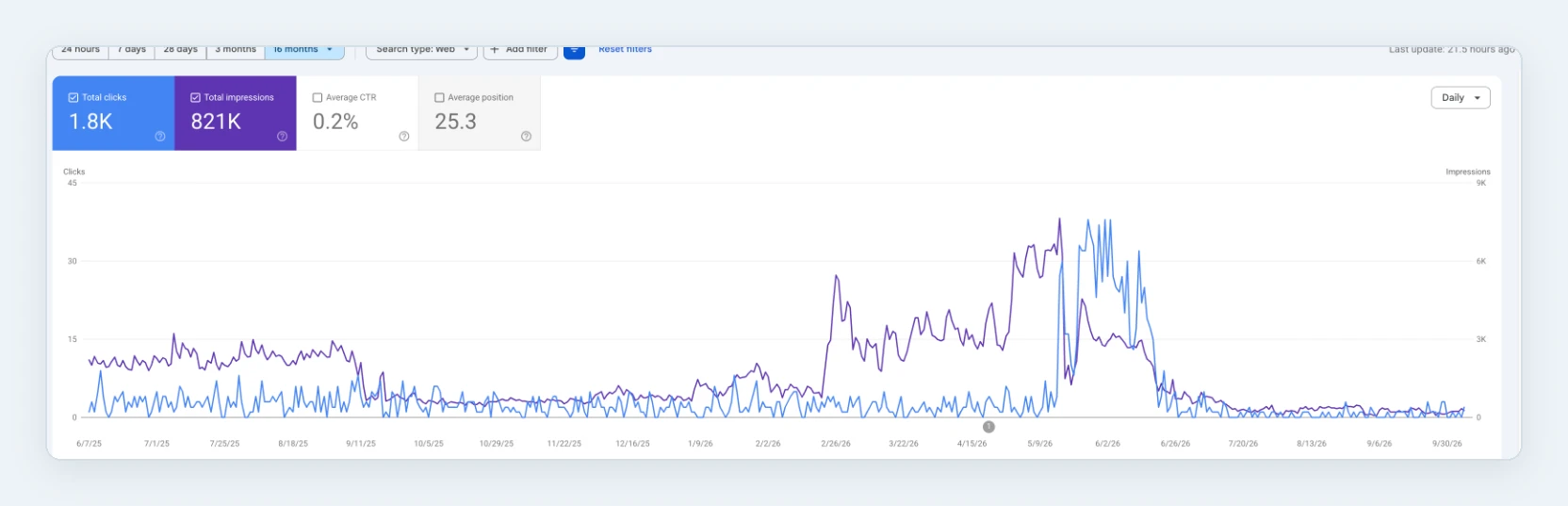
Search Console, Performance, last 16 months: 1.8K clicks and 821K impressions, with the hack spike in May and June 2026.
The Queries tab tells the same story. Next to our brand name and "wordpress development services", the top queries for the whole period include Japanese searches for sticker books and watches that have nothing to do with web development:
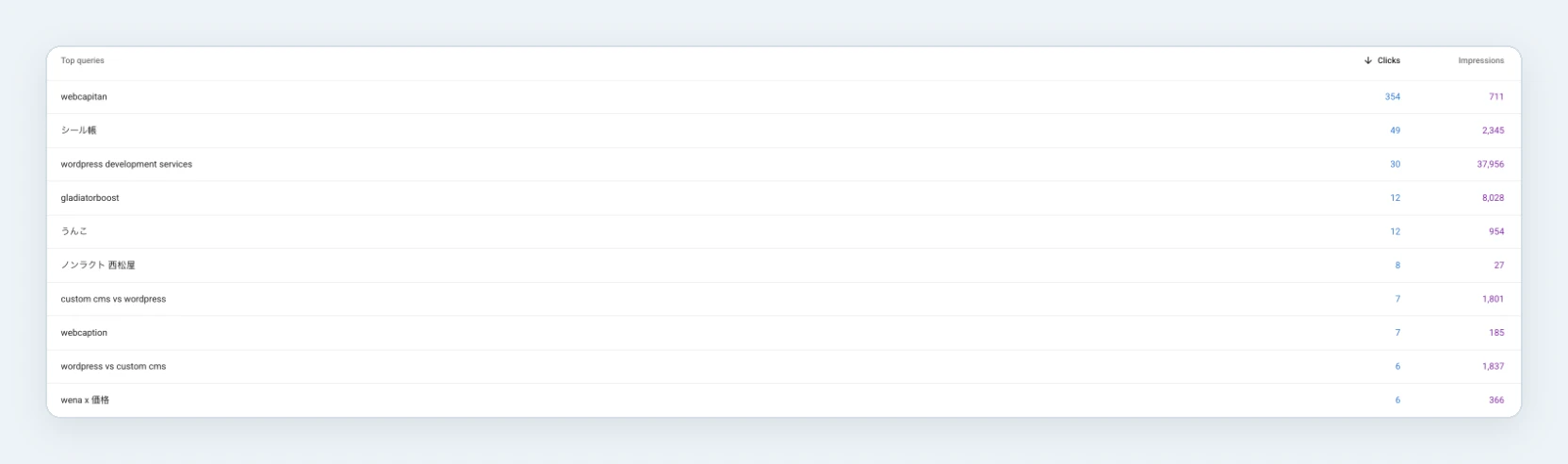
Top queries over 16 months: our brand, our main service, and Japanese spam from the hack.
We have described how we found and removed the hack in a separate case study: how to find and fix the Japanese keyword hack on WordPress. The short version is that we had two options, clean the existing WordPress installation or rebuild, and we had already planned to move the site to a new stack. The hack turned that plan into the priority.
Why Next.js and Node.js, not another CMS
We chose Next.js for the public site and Node.js for the backend because it is the stack we build for clients, it removes the plugin layer completely, and it gives us full control over speed and SEO. Here is how we weighed it.
1. Our website should show what we build
Most of our new projects are web applications, client portals and integrations built with Node.js and Next.js. An agency that sells this work and runs its own site on a page builder sends a mixed message. The new site is now a working example: when a client asks how we handle content, previews, caching or SEO in a Next.js project, we can show them our own admin.
2. Fewer moving parts, a smaller attack surface
The new site has no plugins, no public PHP files and no admin at a well-known address. The public site only reads published content from the API. The admin works with short-lived tokens in an httpOnly cookie, checks the session on every request and requires a CSRF token for every change. Most WordPress hacks start with an outdated plugin or a guessed password at /wp-login.php; neither exists here.
3. Speed without caching plugins
Next.js renders pages ahead of time and keeps them in a cache, so a visitor gets ready HTML instead of waiting for PHP and the database. When an editor saves something in the admin, the backend tells the site to refresh its cache, so the change is live within seconds. On a mid-range phone over a throttled mobile connection our home page shows its main content in about 1.5 seconds and weighs about 450 KB in total; the server starts answering in about 0.2 seconds.
4. SEO under our control
On WordPress the SEO plugin decided how titles, sitemaps and structured data worked. Now that logic is our own code: sitemaps with real modification dates, JSON-LD for the organisation, services, articles, breadcrumbs and FAQs, an llms.txt file for AI assistants, and IndexNow submissions so Bing and other engines hear about new pages within half an hour.
Why not headless WordPress?
We considered keeping WordPress as a headless CMS behind a Next.js front end. It is a good option for teams who love the WordPress editor, and we build it for clients. For us it would have kept the part we wanted to leave: a WordPress installation with plugins that still needs updates and protection. Our content model is small (services, cases, articles, FAQs), so a custom admin was the simpler choice.
How the new site works
The new webcapitan.com is three small applications in one repository that share one API and one database. The diagram shows how a visitor's request and an editor's change flow through them.
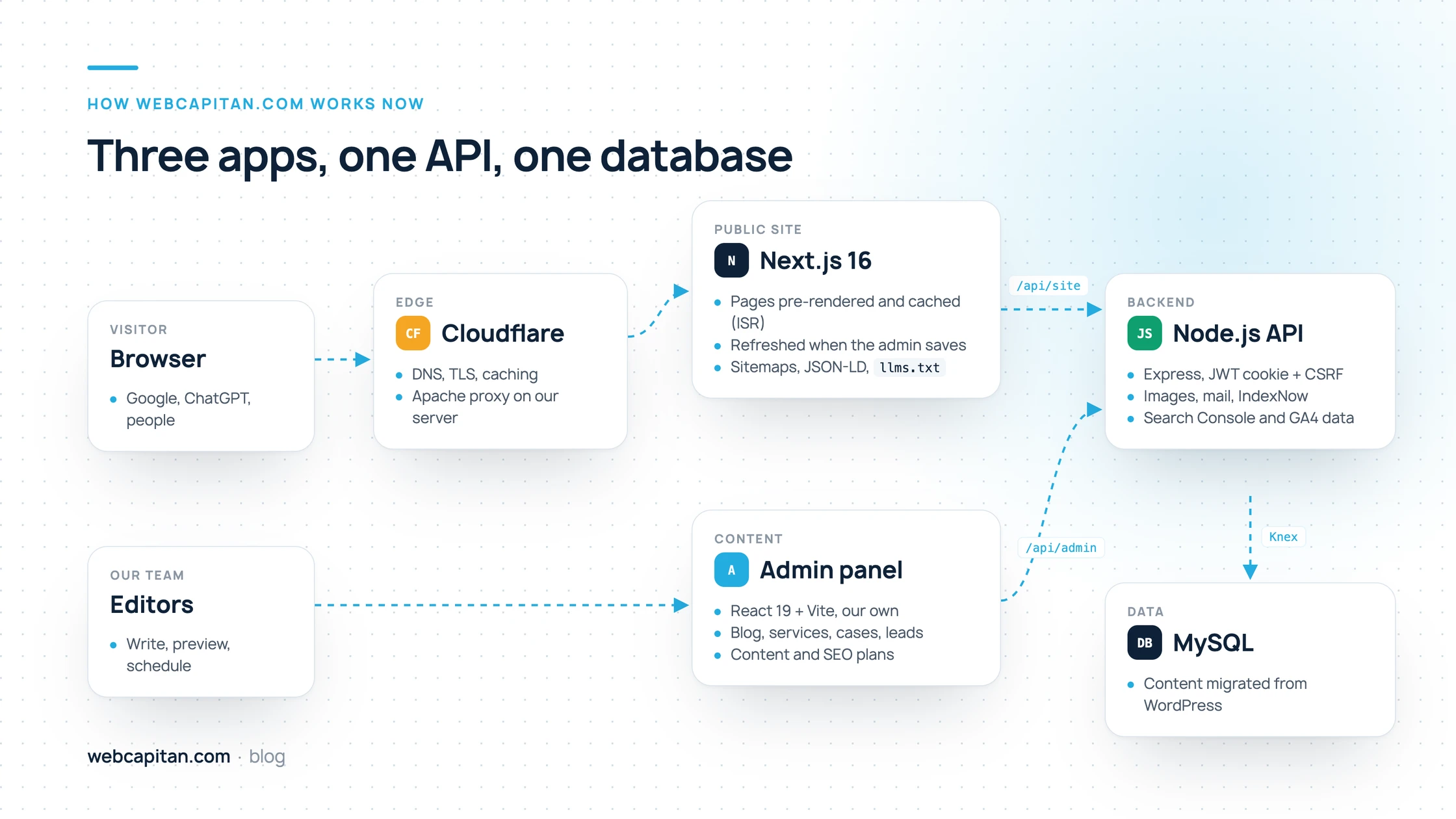
Visitors reach the pre-rendered Next.js site; editors work in the admin; both talk to one Node.js API.
- Public site (Next.js 16, App Router). Renders every page on the server, caches it and refreshes it on demand. No content is hard-coded: services, cases, articles, FAQs and page copy all come from the API.
- Backend (Node.js, Express, Knex, MySQL). A REST API with a public read-only part for the site and a protected part for the admin. It stores images, sends mail, submits new URLs to IndexNow and pulls data from Google Search Console and Google Analytics.
- Admin panel (React 19 and Vite). A single-page app where our team edits everything the site shows.
Everything runs on the same server that hosted WordPress, behind Cloudflare. The site and API are Node.js processes managed by PM2, and Apache only passes requests to them. Locally the same setup runs in Docker, and a closed staging copy lets us check changes on real data before they reach the live site.
How we migrated without losing rankings
The most important rule of the migration was simple: every page that existed on the WordPress site had to exist at exactly the same address on the new site. Here are the steps we followed.
- A full local copy of WordPress as the source of truth. We copied the files and the database to a local machine and used them as the reference for every page, title and description.
- Content import from the WordPress database. Services, cases, blog posts, tags, authors, FAQs and images were moved by scripts into new tables. Titles and descriptions from Yoast SEO came along into each page's own SEO fields.
- URL parity, checked one by one. Every public URL of the old site, including nested service pages and blog pagination, was compared with the new site. Where WordPress had a historical quirk in a URL, we kept the quirk rather than add a redirect.
- Staging behind a password. The new site ran on a closed subdomain with search engines blocked until everything matched.
- A switch you can undo. We took backups of WordPress, the database and the server configuration, then pointed the domain at the new site by swapping folders. WordPress was archived on a separate subdomain with noindex on every response.
- 410 Gone for the spam URLs. Every
/?o=address from the hack now answers410 Gone, which tells Google the page was removed on purpose. A separate sitemap lists 17,458 of these URLs so Google recrawls and drops them sooner. - Fresh sitemaps and IndexNow. The new sitemap lists only real pages with real dates, and new or updated pages are submitted to IndexNow automatically.
One warning from our own experience: do not use the Search Console Removals tool with the prefix /?o= or any other prefix that starts at the root. For Google that prefix matches the whole site, and you can remove every page you have from search results.
A month after the switch, the Page indexing report shows what a cleanup like this looks like. Most of the "not indexed" pages are spam URLs on their way out: blocked by the old robots.txt, answering 404 or 410, or crawled and left out of the index. That is the result we want.
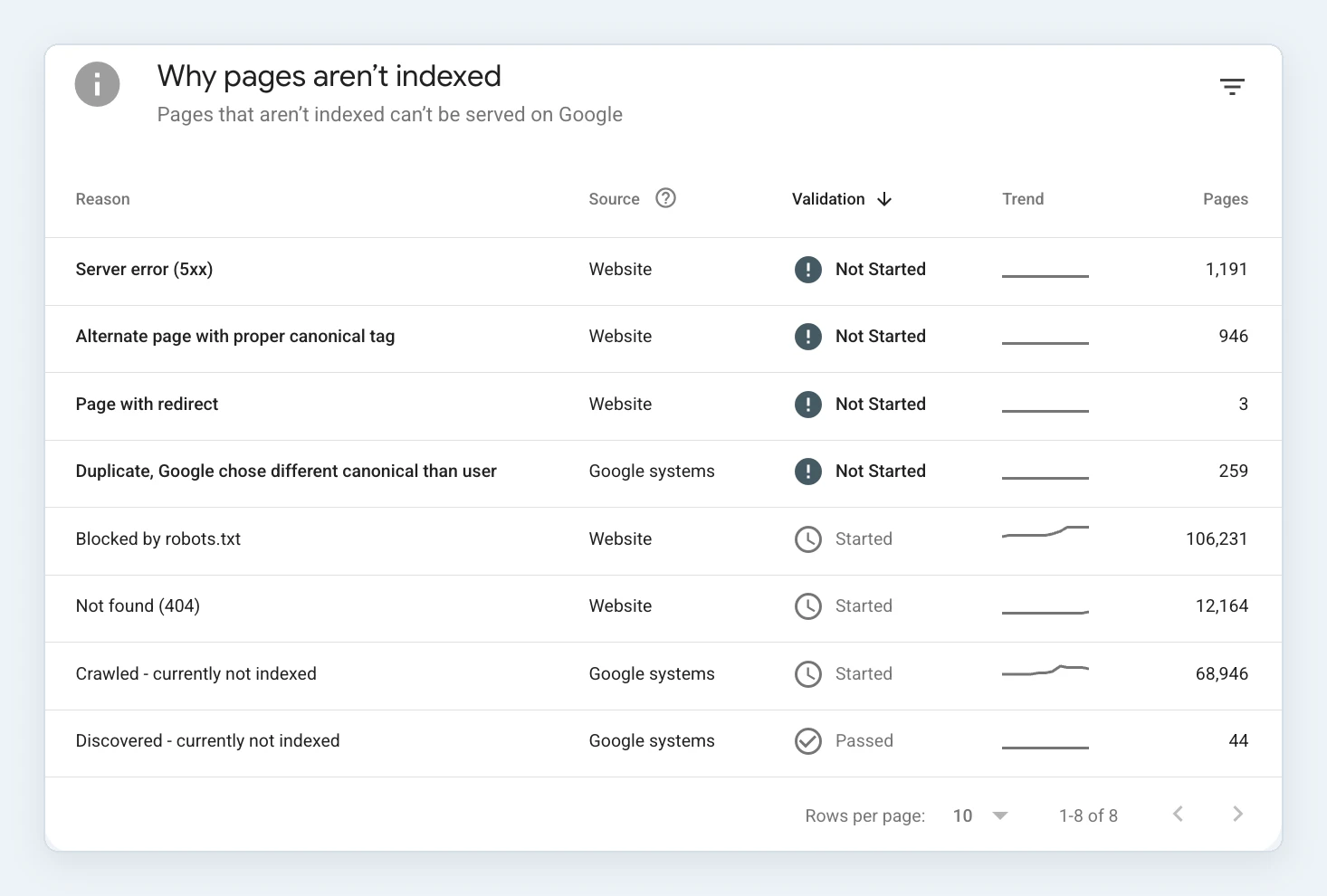
Page indexing, October 2026: the large numbers are spam URLs from the hack being dropped, not real pages.
If you are planning a similar move, our team can handle it for you as a WordPress migration project.
What we built instead of wp-admin
Leaving WordPress meant building our own admin panel, and this is where most of the work went. In return, the admin now does exactly what our team needs and nothing else.
- Blog with a rich text editor, authors, tags and categories, scheduled publishing and a preview of drafts on the real site before they go live.
- Services and cases with their own SEO fields, FAQs that produce FAQ structured data, and a preview of unpublished cases.
- Page content for every block of the site, from the home page headline to the footer, so the team never needs a developer for copy changes.
- Leads from the contact form, each with the landing page, referrer, UTM tags and channel it came from.
- Content plan with weekly topic options, briefs and keywords, linked to the articles written from them.
- SEO plan with tasks, target keywords and Search Console queries pulled in automatically, so we see positions next to the work that should move them.
- Analytics from Search Console and Google Analytics inside the admin, and a module that prepares Instagram posts from blog articles.
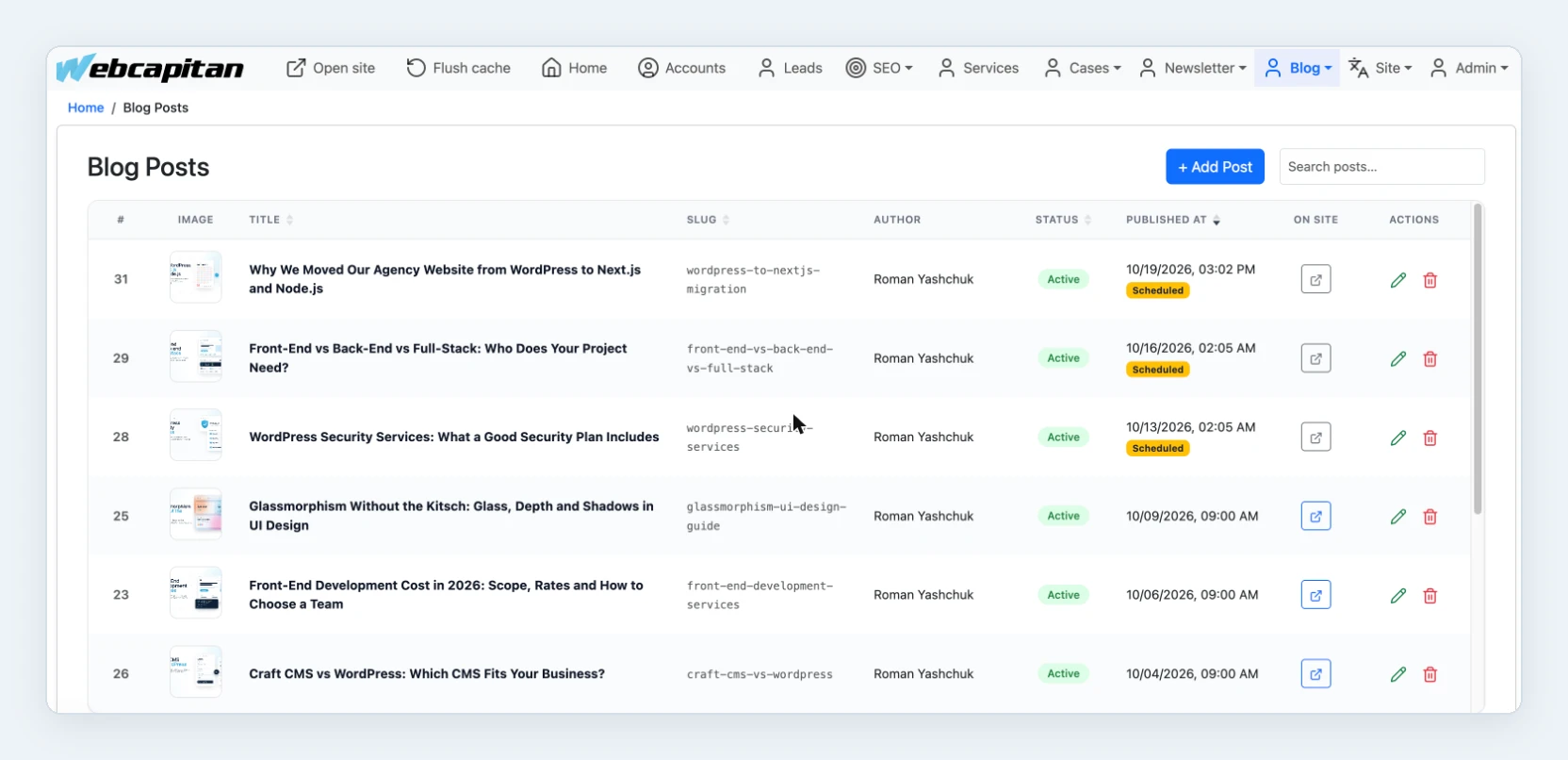
The blog in our admin: every post with its status, scheduled date and a button to preview it on the site. This article is in the list too.
The content plan is where articles like this one start. Each week has three or four topic options built from real Search Console queries: the brief shows the search demand, our current position and the service page the article should link to.
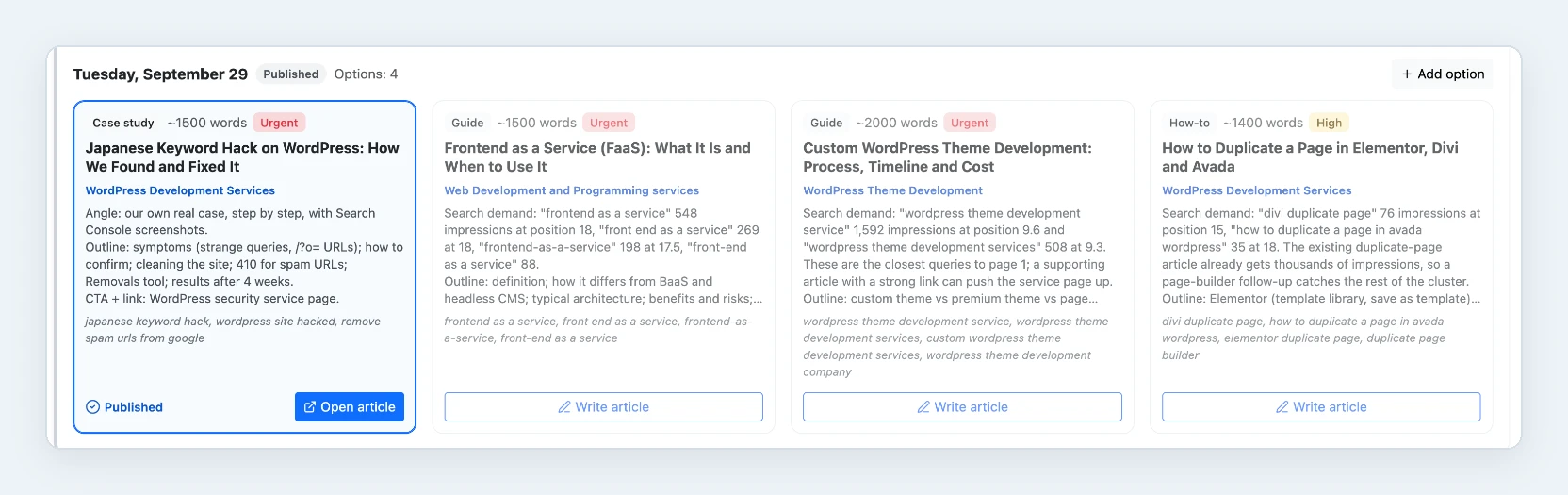
One week of the content plan: the published hack case study and three spare topics with their search demand.
The SEO plan turns the strategy into tasks. After the hack its first stage was the clean-up: check Security issues, deploy 410 Gone for the spam URLs, scan the old WordPress before archiving it and confirm the Japanese queries are gone. Next to the tasks the admin tracks 914 target keywords and how many of them have moved up.
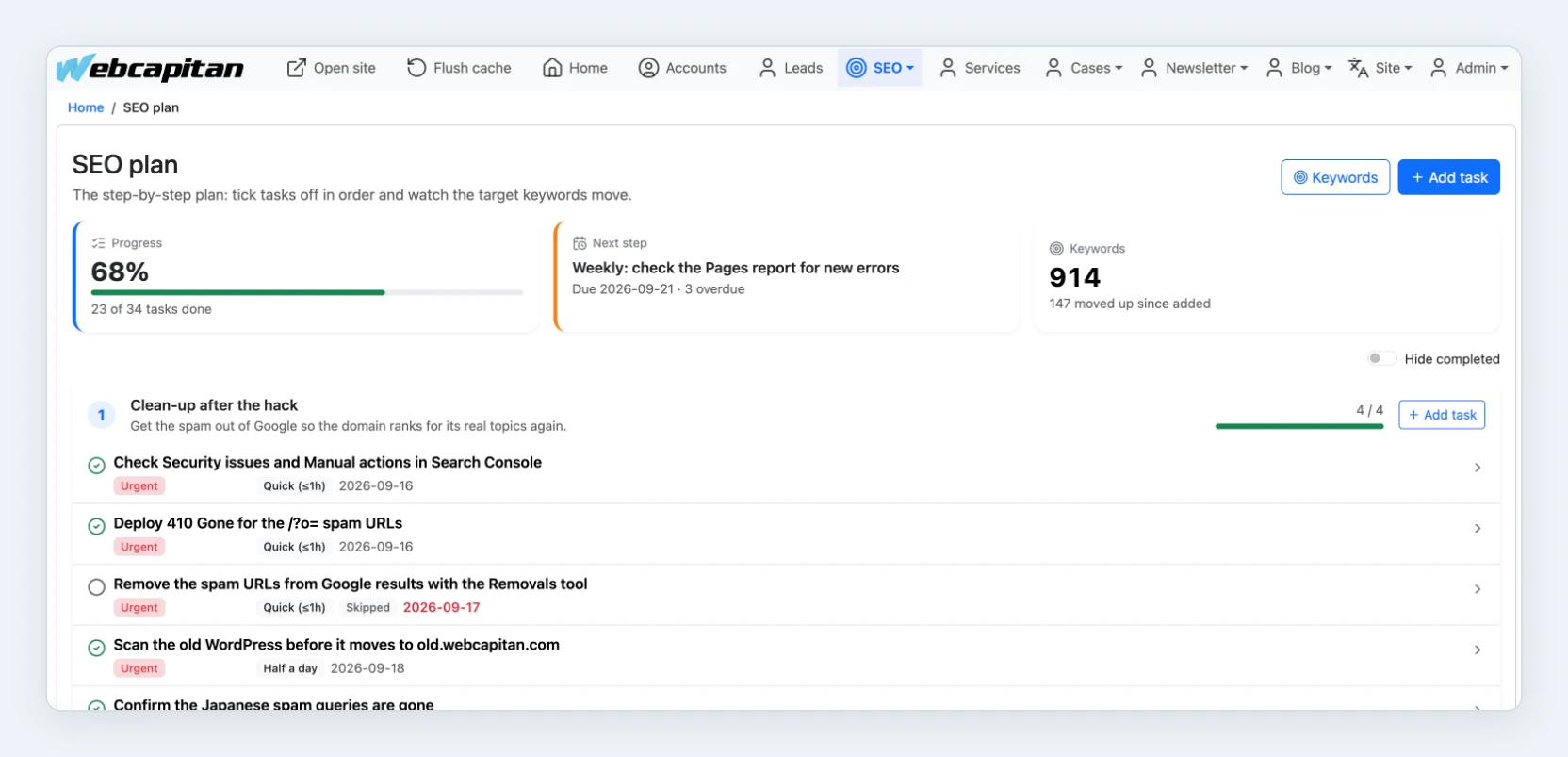
The SEO plan: 23 of 34 tasks done, the hack clean-up stage complete, 914 keywords tracked.
Results so far
A month in, the technical side has clearly improved, while search rankings are recovering slowly. Here is an honest summary.
- No plugin updates. Nothing to patch every week, and no part of the site written by a third party we cannot check.
- Faster pages. Pre-rendered pages, about 450 KB for the home page, main content in about 1.5 seconds on a throttled mid-range phone.
- Weekly releases. Since the switch we have shipped a full redesign, a new 404 page, new service pages and dozens of improvements, each through version control and a one-command deploy.
- A cleaner index. Google has 578 of our pages indexed and is steadily dropping the spam URLs.
- Rankings take time. After a hack Google needs months to trust a domain again. Some pages that ranked before the attack are still below their old positions, and we track them every week in the SEO plan.
We will update this article with traffic numbers once there are three full months of data after the switch.
What we would do differently
If we started again, we would make the URL inventory first, plan the admin before the design and watch Search Console from day one. In more detail:
- Export every URL before you touch anything. Sitemaps miss things: pagination, tag pages, author pages and old URLs that still get links. Combine the sitemap, Search Console and server logs.
- Budget for the admin. The public site is the visible part, but editors spend their days in the admin. Previews, scheduling and SEO fields took more time than any page template.
- Keep the old site reachable but hidden. An archived copy with noindex saved us more than once when we needed to check how an old page looked.
- Do not trust "No issues detected". Search Console's Security issues report stayed green during the whole hack. Watch Performance and Page indexing for URLs you did not create.
Should you move your WordPress site to Next.js?
Move to Next.js and Node.js when your website is becoming an application or when the plugin stack has become a risk; stay on WordPress when your team needs a familiar editor and a large choice of developers. A quick guide:
| Stay on WordPress if… | Consider Next.js and Node.js if… |
|---|---|
| Your site is mostly pages and posts edited by marketers | Your site needs logins, dashboards, calculators or integrations |
| You rely on plugins such as WooCommerce or a form builder | You keep adding plugins to make WordPress do custom things |
| You want the largest pool of developers and agencies | You already have, or plan to hire, a JavaScript team |
| Budget is tight and a theme covers the design | Speed, security and SEO control are worth a custom build |
There is also a middle way: keep WordPress as the editor and build the front end in Next.js. If your WordPress site works but is slow or hard to maintain, start with WordPress support or speed optimisation before you consider a rebuild.
FAQ
How long does a WordPress to Next.js migration take?
Our own site took about three months from the first commit to launch, with the team working on it between client projects. A typical business website with a few dozen pages and a blog takes six to twelve weeks; sites with custom features, e-commerce or many content types take longer.
Will I lose Google rankings if I move from WordPress to Next.js?
Not if you keep the same URLs, titles, descriptions and structured data, or map every changed URL with a 301 redirect. Rankings drop when pages disappear, URLs change without redirects or content gets thinner. Keep a full list of old URLs and check Search Console daily for the first weeks.
Can editors still change content without a developer?
Yes. On a custom stack the admin panel is part of the project. Our team edits every text, image, service, case and article in our own admin, with previews and scheduling. On a headless WordPress setup editors keep using wp-admin.
Is Next.js more secure than WordPress?
A Next.js site with a custom API has a much smaller attack surface: no plugins, no public PHP files and no well-known login page. It is not secure by default, though. You still need updates of your dependencies, proper authentication, backups and monitoring.
Does Webcapitan still build WordPress websites?
Yes. We build and support WordPress websites for clients every week, and for many content-led sites it remains our first recommendation. We moved our own site because it had outgrown WordPress, not because WordPress is a bad platform.
Conclusion
We moved webcapitan.com from WordPress to Next.js and Node.js because a hack showed how much risk 39 plugins carried, and because our own website should run on the stack we build for clients. Keeping every URL the same, answering 410 for spam and building an admin around how our team actually works made the move safe. If you are weighing the same decision for your site, send us a short brief: we will tell you honestly whether to stay on WordPress, go headless or rebuild, and what each option costs.
About the author

CEO & Founder, Webcapitan
Roman Yashchuk founded Webcapitan in 2014 and leads the team of 22 designers and developers in Vinnytsia and London. He works hands-on in UI/UX design, WordPress and PHP/Laravel development, and writes about choosing platforms, costs and keeping websites fast and secure.
All articles by Roman Yashchuk